Experiencing frustrating Roblox crashes? You're not alone. This comprehensive guide delves into why Roblox might be crashing for you, covering everything from widespread server outages to localized device and internet connection issues. We'll explore practical troubleshooting steps for PC, mobile, and console users, helping you quickly identify and resolve common problems. Learn how to check Roblox server status, optimize your game settings, and understand the role of updates in maintaining smooth gameplay. For adult gamers balancing life, work, and precious gaming time, minimizing downtime is key. Discover actionable tips to get back into your favorite experiences, socialize with friends, and continue building your skills without constant interruptions. Stay informed on the latest trends and solutions to keep your Roblox adventures seamless and fun. We cut through the hype to give you real, problem-solving advice that works for the average gamer, ensuring you spend less time troubleshooting and more time enjoying.
Q: Why is Roblox crashing so often lately for adult gamers?
A: Roblox crashes often stem from a mix of client-side issues like outdated apps or device resource limitations, and server-side problems that can affect millions. For busy adult gamers, unexpected crashes are frustrating because they cut into limited free time. This month, we've seen trends where server load during peak hours or specific game updates can cause instability. Additionally, device compatibility and conflicting background apps are common culprits, especially with cross-platform play becoming more prevalent, meaning your older phone or PC might struggle more with newer experiences.
Q: How can I quickly check if Roblox servers are actually down?
A: To swiftly determine if Roblox servers are down, your first stop should be the official Roblox Status page or reliable third-party trackers like DownDetector. These sites provide real-time updates on server performance and report widespread outages. Checking their official social media channels, particularly X (formerly Twitter), is also a rapid way to get direct announcements from the Roblox team. Don't waste time troubleshooting your own setup until you've confirmed the broader network status.
Q: What are the most common reasons Roblox crashes on a PC?
A: On PC, Roblox crashes frequently occur due to outdated graphics drivers, insufficient RAM, conflicts with antivirus software or firewalls, or a corrupted Roblox installation. Overheating components can also lead to crashes during extended play sessions. Ensuring your operating system and Roblox client are up-to-date, along with performing routine system maintenance, is crucial for stability. Close unnecessary background applications to free up system resources.
Q: My Roblox keeps crashing on mobile. What's the first thing I should try?
A: If Roblox keeps crashing on your mobile device, the absolute first step is to clear the app's cache and data, then restart your device. This often resolves minor software glitches. Ensure your operating system and the Roblox app itself are updated to their latest versions. Insufficient storage space on your phone or tablet can also cause instability, so make sure you have adequate free space for the game to operate smoothly.
Q: Can specific games or experiences within Roblox cause my whole client to crash?
A: Absolutely. Certain games or experiences within Roblox can indeed cause your client to crash. This often happens if an experience is poorly optimized, has too many complex assets, or contains scripting errors. Custom content, especially in less reputable games, can sometimes lead to instability. If you notice crashes primarily when playing a specific game, report it to the game developer and try playing other, well-known experiences to see if the issue persists.
Q: Is my internet speed relevant to why Roblox might crash?
A: While often related to connection *quality* more than raw speed, your internet connection is highly relevant to Roblox stability. Unstable Wi-Fi, packet loss, or high ping can lead to disconnections and client crashes as the game struggles to maintain communication with the servers. A consistently strong, stable connection is more important than just high bandwidth. Try a wired connection if possible, or move closer to your router to improve signal strength.
Q: How do conflicting background applications affect Roblox performance and crashes?
A: Conflicting background applications can significantly impact Roblox performance and lead to crashes by hogging CPU, RAM, or GPU resources. Programs like web browsers with many tabs open, streaming services, other games running simultaneously, or even certain antivirus software can create resource contention. Before launching Roblox, close any non-essential applications to dedicate maximum system resources to the game, ensuring a smoother and more stable experience.
There's nothing quite like settling down after a long day of work, finally getting a moment to yourself to unwind with your favorite Roblox experience, only for the game to suddenly crash. For many of us, gaming isn't just a pastime; it's a vital escape, a way to connect with friends, or even a skill-building exercise. When Roblox crashes, it's not just a minor inconvenience; it disrupts that precious relaxation time and can feel incredibly frustrating. You find yourself asking, 'Why is Roblox crashed?' and searching for quick, reliable answers. You're not alone in this. Millions of US gamers, many averaging around 36 years old and balancing demanding jobs and families, rely on platforms like Roblox for their digital recreation. With 87% of gamers regularly playing and dedicating 10+ hours a week, and mobile gaming dominating the landscape this month, ensuring a smooth, crash-free experience is more important than ever. This guide is built for you – the practical gamer who values solutions over hype. We'll dive deep into why Roblox crashes, how to diagnose the problem, and practical steps to get you back into the action, fast.
We understand that your gaming time is valuable, and you want straightforward advice that works. So, let's cut through the noise and figure out why is Roblox crashed and what you can do about it, from simple checks to more in-depth troubleshooting.
Why is Roblox Crashing Unexpectedly? Unpacking the Core Causes
Roblox crashes can stem from a variety of sources, both on your end and on Roblox's. Understanding these common culprits is the first step to a quick fix. Often, it's a combination of factors. Server-side issues, such as a widespread outage or maintenance, are the easiest to identify but usually out of your control. Client-side problems, relating to your device, internet connection, or game installation, are more common and often require your intervention. Recognizing the difference is key to efficient troubleshooting.
How Can I Quickly Check If Roblox Servers Are Down?
Before you dive into complex troubleshooting, confirm if the problem is on Roblox's end. This is usually the cause if 'why is Roblox crashed' is trending. The quickest way to check is by visiting the official Roblox Status page. This site provides real-time updates on server performance and reports any known outages. If the status page shows active issues, then it's a waiting game. Additionally, check reputable third-party sites like DownDetector or Roblox's official social media channels, particularly X (formerly Twitter), for immediate announcements. If servers are down, your best bet is patience.
What Are the Common Reasons Roblox Crashes on My PC?
PC gamers often face specific challenges. If Roblox keeps crashing on your desktop or laptop, consider these common reasons:
- Outdated Graphics Drivers: Your GPU drivers are crucial. Ensure they are up-to-date for optimal performance and stability. Outdated drivers are a frequent cause of game crashes.
- Insufficient System Resources: Roblox, especially complex experiences, can be resource-intensive. Running too many background applications, having insufficient RAM, or a weaker CPU can lead to crashes.
- Corrupted Roblox Installation: Sometimes game files get corrupted. A fresh reinstallation can resolve many persistent issues.
- Antivirus/Firewall Interference: Your security software might be mistakenly blocking Roblox. Temporarily disabling it (with caution) or adding Roblox to its whitelist can help diagnose this.
- Overheating: Extended gaming sessions can cause your CPU or GPU to overheat, leading to performance throttling and crashes. Ensure proper ventilation and cooling.
Remember, a robust PC setup allows for a more stable experience. For gamers on a budget, optimizing software before upgrading hardware is often the smartest move.
Troubleshooting Roblox Crashes on Mobile Devices: A Step-by-Step Guide
Mobile gaming is huge, with many US gamers primarily playing on their phones or tablets. If Roblox is crashing on your mobile device, try these steps:
- Restart Your Device: The classic fix. A simple restart can clear temporary glitches and free up memory.
- Clear App Cache and Data: Go to your device's app settings, find Roblox, and clear its cache. On Android, you might also have the option to clear data, which will require you to log back in.
- Update Roblox App: Ensure you have the latest version from your app store. Developers constantly release updates to fix bugs and improve stability.
- Free Up Storage Space: Mobile devices need free space to operate efficiently. If your storage is nearly full, it can cause apps to crash.
- Update Operating System: Keep your phone's OS updated. Older versions might have compatibility issues with newer Roblox updates.
- Check Network Stability: Mobile data or Wi-Fi can be inconsistent. Test your connection quality.
These steps address the majority of mobile-specific 'why is Roblox crashed' scenarios, helping you get back to your social gaming on the go.
Is My Internet Connection to Blame for Roblox Downtime?
A stable internet connection is paramount for any online game. While raw speed is important, connection quality (low latency, minimal packet loss) is often more critical for preventing Roblox crashes or disconnections. If your internet is spotty, even if fast, it can cause the game to lose connection with Roblox servers, leading to a crash or being kicked out.
- Test Your Connection: Use online speed tests to check ping and packet loss. High ping or frequent packet loss indicates an unstable connection.
- Restart Your Router/Modem: A simple power cycle can often resolve minor network issues.
- Wired Connection (PC/Console): If possible, use an Ethernet cable instead of Wi-Fi for a more reliable connection.
- Move Closer to Router (Wi-Fi): Reduce interference and improve signal strength.
- Check for Network Congestion: Are others on your network streaming 4K video or downloading large files? This can impact your gaming experience.
For adult gamers, ensuring a reliable home network minimizes frustration and allows for uninterrupted gaming sessions after a long day.
When Should I Update My Roblox App and Device Software?
Regular updates are not just recommended; they are essential for optimal Roblox performance and stability. Developers release updates to fix bugs, introduce new features, and improve security. Neglecting updates can lead to compatibility issues and increased crashes. Aim to update your Roblox app as soon as a new version is available. Similarly, keep your device's operating system (Windows, macOS, iOS, Android) and graphics drivers (for PC) up-to-date. Think of it as routine maintenance for your gaming rig – it keeps everything running smoothly and prevents unexpected breakdowns, especially when balancing gaming with a busy life.
Do Specific Roblox Games or Experiences Cause Client Crashes?
Yes, absolutely. Not all Roblox experiences are created equal. Some games within the platform, especially those with complex scripting, high-fidelity graphics, or simply poor optimization from the developer, can put a greater strain on your system. If you notice that Roblox consistently crashes only when you play a particular game, that experience itself might be the culprit. This is often the case with newer, experimental titles or those with a huge number of players. Try playing other popular, well-optimized games to see if the issue persists. If it's specific to one experience, consider reporting the issue to the game's developer within Roblox or looking for updates from them.
Optimizing Your System: How to Improve Roblox Stability and Performance
Beyond fixing crashes, you want a smooth, enjoyable experience. Optimizing your system can significantly reduce the likelihood of future crashes and improve overall performance. Here's how:
- In-Game Graphics Settings: Lowering graphics quality, texture detail, and reducing render distance within Roblox can dramatically improve performance, especially on older or less powerful hardware.
- Close Background Applications: Before launching Roblox, close web browsers, streaming apps, download managers, and other resource-hungry programs.
- Disk Cleanup & Defragmentation (PC): Regularly clean up temporary files and defragment your hard drive (for HDDs, not SSDs) to keep your system lean.
- Adjust Power Settings (PC): Ensure your PC is set to 'High Performance' power mode, not 'Power Saver,' to allow your hardware to perform optimally.
- Keep Drivers Updated: Beyond graphics, ensure chipset and audio drivers are current.
These simple optimizations can make a significant difference, helping you get the best value from your existing hardware and ensuring your gaming time is truly relaxing.
Balancing Gaming and Life: Quick Fixes for Busy Players
For adult gamers, time is a precious commodity. You don't have hours to troubleshoot. Here are quick, actionable fixes for when Roblox crashes, designed for maximum efficiency:
- The 5-Minute Reboot: Restart your entire system (PC, console, or mobile) and your router/modem. This often clears minor glitches.
- Server Status First: Check Roblox's official status page immediately. If it's a widespread outage, you save yourself unnecessary troubleshooting.
- Update Check: Quickly verify if your Roblox app and device OS have pending updates. An outdated component is a common, easy fix.
- Minimalist Approach: Close all non-essential apps before launching Roblox. Dedicate all resources to the game.
- Quick Reinstall (if desperate): If problems persist after quick checks, a clean reinstall of Roblox can often fix deeper corruption.
These steps prioritize speed and impact, getting you back to building skills or socializing with friends online without extended downtime.
What to Do When Roblox Still Crashes: Advanced Steps and Support
If you've tried all the common troubleshooting steps and Roblox continues to crash, it's time for more advanced measures or to seek professional help.
- Check Event Viewer (PC): For PC users, the Windows Event Viewer can sometimes provide clues about what caused the crash. Look for critical errors related to Roblox.
- Run System File Checker (PC): The 'sfc /scannow' command can identify and repair corrupted Windows system files that might be affecting Roblox.
- Reinstall Graphics Drivers (Clean Install): Use a tool like Display Driver Uninstaller (DDU) to completely remove old drivers before installing the latest version.
- Contact Roblox Support: If all else fails, reach out to Roblox's official support team. Provide them with as much detail as possible: your device specifications, error messages, and all the troubleshooting steps you've already taken. They can offer specific diagnostic tools or account-level assistance.
- Community Forums: Sometimes, specific niche issues are discussed on Roblox community forums or Reddit. A quick search might reveal others with the same problem and a community-found solution.
Don't hesitate to seek help when you've exhausted your options. Gaming should be fun, not a constant battle with technical issues.
FAQ: Quick Answers to Your Roblox Crash Questions
Here are some frequently asked questions about why Roblox crashed, offering quick, direct answers for your convenience.
Q: Can a VPN cause Roblox to crash or disconnect?
A: Yes, a VPN can sometimes cause Roblox to crash or disconnect by introducing latency, packet loss, or routing issues that disrupt the game's connection to its servers. While VPNs can offer privacy or access geo-restricted content, they can also interfere with real-time online gaming if the connection isn't optimized for low latency. If you experience crashes while using a VPN, try disabling it to see if the issue resolves.
Q: How often does Roblox experience major outages?
A: Major Roblox outages are relatively infrequent but do occur periodically, often due to massive server load during popular events or unexpected technical issues. While smaller, localized server hiccups might happen more regularly, platform-wide crashes affecting millions are less common. Roblox continuously invests in server infrastructure to minimize downtime, but no online service is entirely immune. Monitoring their official status page remains the best way to stay informed about current incidents.
Q: Is it safe to delete Roblox cache files?
A: Yes, it is generally safe to delete Roblox cache files. Clearing the cache can often resolve performance issues, graphical glitches, and even crashes by removing corrupted temporary data. Your game will rebuild these files as needed, which might take a moment longer to load specific experiences initially, but it won't harm your account or game progress. It's a recommended troubleshooting step for both PC and mobile users.
Q: Does Roblox use a lot of data when playing on mobile?
A: Roblox can use a moderate amount of data on mobile, depending on the complexity of the experience and how long you play. While it's generally not as data-intensive as streaming high-definition video, playing for several hours, especially in graphically rich games, can accumulate significant data usage. Always monitor your data usage in your phone settings if you have a limited data plan, and prefer Wi-Fi when possible to save cellular data.
Q: How do I report a crashing Roblox game to developers?
A: If a specific Roblox game or experience is consistently crashing, you should report it directly to the experience's developer. Many games have in-game reporting tools or links to their Discord servers or social media where you can provide feedback. Additionally, you can report problematic experiences through the Roblox platform itself. Be sure to provide detailed information about when and how the crash occurs to help developers diagnose and fix the issue.
Q: What are the minimum system requirements for Roblox in 2026?
A: While Roblox continually optimizes, in 2026, the general minimum requirements remain accessible. For PC, expect at least Windows 7, an Intel Core i3 or AMD equivalent, 4GB RAM, and a graphics card like an NVIDIA GeForce GT 710 or AMD Radeon R7 240. For mobile, most devices less than 5 years old with 2GB+ RAM should run it. Newer, more graphically intensive experiences will naturally demand more, so exceeding these minimums ensures a smoother experience.
Conclusion
Experiencing a 'why is Roblox crashed' moment can be a real buzzkill, especially when you've carved out precious time for gaming. But armed with the knowledge from this guide, you're now equipped to tackle most of these frustrating issues head-on. Remember to start with the basics: check server status, ensure your internet is stable, keep your apps and drivers updated, and optimize your device's performance. For adult gamers balancing life's demands, efficiency in troubleshooting means more time enjoying the social, skill-building, and relaxing aspects that Roblox offers. Don't let a crash steal your joy; take control and get back into your favorite experiences faster. We hope these practical tips help you maintain a seamless and fun Roblox journey.
What's your biggest Roblox troubleshooting challenge? Share your tips or questions below! Let's build a stronger, crash-free gaming community together.
Roblox server status, internet connection problems, device specific crashes, app updates importance, in-game bug troubleshooting, hardware optimization, balancing gaming with daily life, Roblox performance issues, fixing Roblox lag
35


FIXED Roblox Keeps Crashing FIX Roblox Keeps Crashing . Why Does My Roblox Keep Crashing TechCult Why Does My Roblox Keep Crashing . Why Do My Games Keep Closing At Erin Wright Blog Roblox Keep Crashing . Roblox How To Fix Roblox Crash Crashing Complete Guide YouTube . Roblox Keeps Crashing Why Does My Roblox Keep Crashing Mobile TikTok


How To Fix Roblox Crashing On PC YouTube . How To Fix Roblox Crashing Freezing 2026 Step By Step Guide YouTube . How To Fix Roblox Crashing TUTORIAL YouTube . WE CRASHED ROBLOX Fandom 755. Why Does Roblox Keep Crashing On My PC Possible Reasons Workarounds E4d21 1920

Roblox Keeps Crashing Why Does My Roblox Keep Crashing Mobile TikTok Roblox Keeps Crashing Fixed . Roblox Keeps Crashing On Windows PC Roblox Keeps Crashing . Is Roblox Down Right Now Issues Roblox Not. Roblox Keep Crashing Windows 10 C Ch Kh C Ph C L I M I Ng I U N N Bi T . Roblox Keeps Crashing 9 Efficient Ways To Fix It Free Word Template Roblox Keeps Crashing
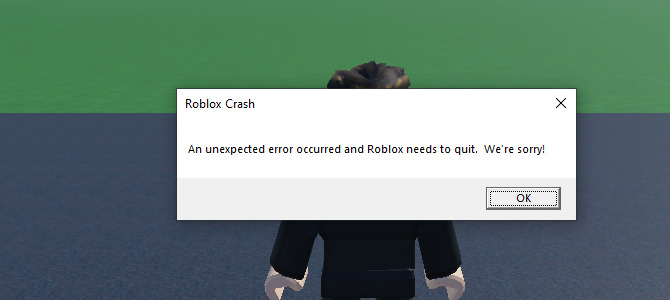

How To Fix Roblox Crash Mobile 2022 Roblox Crashing Fix Android Why . Why My Roblox Always Crash H Ng D N Kh C Ph C L I Hi U Qu Nh T . Is Roblox Down Check Server Status In March 2026 Live Updates Is Roblox Down . Roblox Keeps Crashing In 2023 How To Fix On PC Mobile Why Does Roblox Keep Crashing 768x432 . Roblox Shutting Down Today Lets Get The Facts Straight



Why Roblox Stock Crashed Today The Motley Fool Image. How To Resolve Roblox Crashing Issues Easily 10 Roblox Crashing 2 . Why Is Roblox Crashing Today I Ll Tell You Why YouTube . Roblox 2026 Shutdown Why We Actually WANT It YouTube Oardefault . How To Make Your Roblox Stop Crashing H Ng D N Kh C Ph C L I Chi Ti T


Stop Roblox Crashing Your Easy Guide Roblox Keeps Crashing . Why Is Microsoft Roblox Not Working Solutions For 2026 Roblox . Roblox Stock Crashes 10 After Legal Drama 2026 Roblox Stock Crashes . How To Message On Roblox 2026 A Quick Guide SL1500 . Why Does Roblox Keep Crashing Guide Why Does Roblox Keep Crashing Step 33



Roblox Crash Help R RobloxHelp Roblox Crash Help V0 . How To FIX Roblox Keeps Crashing Stop Roblox Crashing UPDATED YouTube . Roblox Keeps Crashing Why Does My Roblox Keep Crashing Mobile TikTok . How To Fix Roblox Keeps Crashing On Windows 11 10 November 2022 . Roblox Is Down Right Now January 5 2026 Beebom Roblox Shutting Down In 2024 Cover