Navigating the complexities of older hardware in 2026 can be challenging for busy gamers who balance demanding jobs and family life with their passion for interactive entertainment. This comprehensive guide addresses the crucial question: Is the Intel Core i5-7600K still good for gaming? We dive deep into its performance capabilities, limitations, and potential for modern titles. Discover practical advice on optimizing your existing 7600K setup, identifying suitable game genres, and making informed decisions about budget-friendly upgrades. We'll explore how this aging CPU holds up against current trends like social gaming and high refresh rates, providing actionable insights for maximizing your gaming enjoyment without breaking the bank or dedicating endless hours to troubleshooting. This resource aims to empower you with the knowledge needed to get the most out of your hardware, ensuring your precious gaming time is spent playing, not waiting.
How does the 7600K stack up against today's gaming demands?
The Intel Core i5-7600K, a 4-core, 4-thread processor from 2017, largely struggles with today's gaming demands, especially modern AAA titles. Its limited core count becomes a significant bottleneck for games designed for more threads, leading to stuttering, lower frame rates, and an overall choppy experience. While it can still handle esports and older games, new releases will challenge it severely.
What types of games run best on an i5-7600K in 2026?
In 2026, the i5-7600K is best suited for esports titles like Valorant, CS2, League of Legends, older AAA games released before 2019 (e.g., GTA V, The Witcher 3), and less CPU-intensive indie games. It performs well in social and cozy games, which are gaining popularity, offering a smooth experience without needing top-tier hardware.
Why might a gamer still consider using an i5-7600K in 2026?
A gamer might still consider using an i5-7600K in 2026 primarily for budget reasons or if their gaming habits are restricted to less demanding titles. For competitive esports players who prioritize high FPS in specific, optimized games, or those who enjoy older classics and indie gems, the 7600K can still deliver acceptable performance with a suitable GPU and proper optimization.
What are the critical limitations of the 7600K for modern titles?
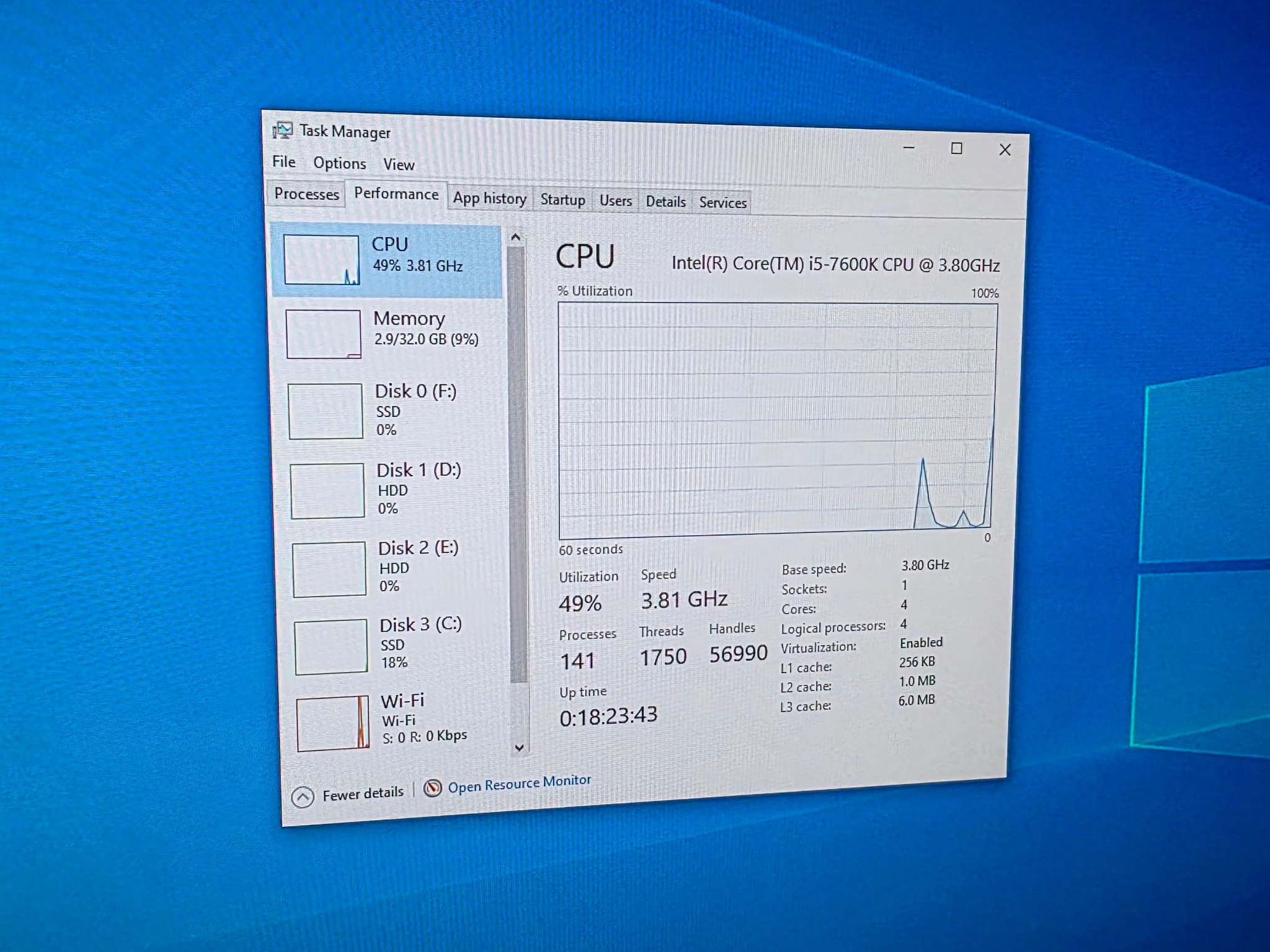
The critical limitations of the 7600K for modern titles stem from its 4-core, 4-thread architecture and lack of multi-threading. Many contemporary games are optimized for 6 or more cores and leverage hyper-threading to handle complex game physics, AI, and open-world environments. The 7600K rapidly hits 100% utilization, creating a CPU bottleneck that hinders performance and causes noticeable stuttering.
When is the ideal time to upgrade from an Intel Core i5-7600K?
The ideal time to upgrade from an Intel Core i5-7600K is when you consistently experience unplayable frame rates (below 30-40 FPS) or severe stuttering in games you want to play, even after optimizing settings. If you've upgraded your GPU and see no significant FPS gains, or if you're looking to play new AAA titles, stream, or run multiple demanding applications simultaneously, a CPU upgrade is essential.
What budget-friendly upgrades pair well with a 7600K system?
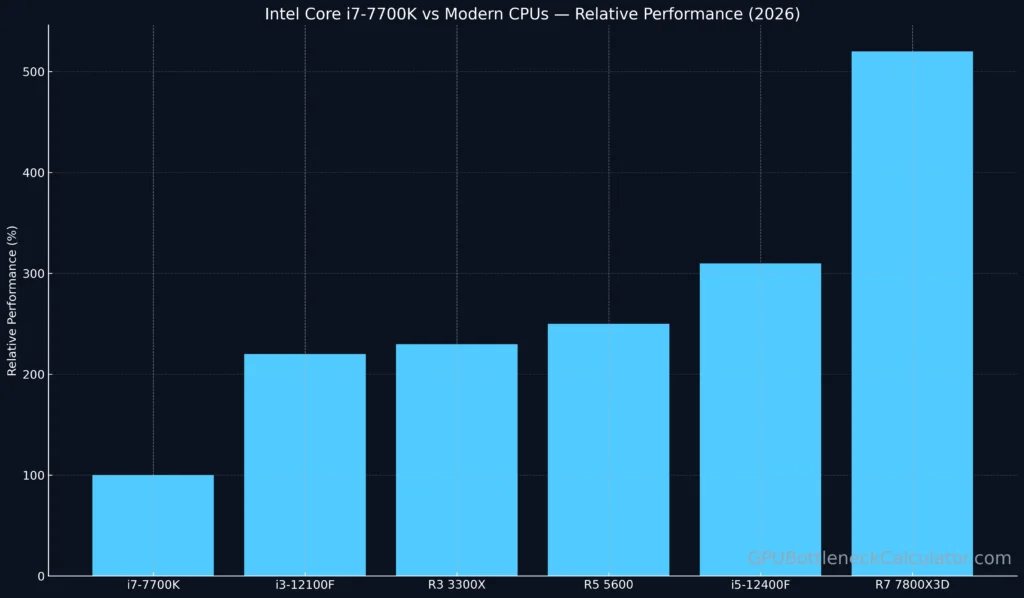
For budget-friendly upgrades for a 7600K system, focus on a modern, entry-level platform swap (new CPU, motherboard, RAM) like an Intel i3-12100F/13100F or AMD Ryzen 5 5600. If strictly limited to your existing motherboard, upgrading to an i7-7700K (used market) is an option, though it offers diminishing returns compared to a full platform overhaul for future-proofing.
How can I optimize my 7600K PC for better gaming performance?
To optimize your 7600K PC for better gaming performance, ensure your CPU is overclocked (if using a Z270 board and good cooling), use 16GB of fast dual-channel DDR4 RAM (3000-3200MHz), install games on an SSD, keep all drivers updated, close background applications, and meticulously adjust in-game settings to reduce CPU-intensive options like crowd density or physics. Physical cleaning also prevents thermal throttling.
You're a gamer, maybe not a teenager anymore, balancing work, family, and that precious hour or two for relaxation with your favorite titles. The thought of a full system overhaul can feel daunting and expensive, especially when your current PC, powered by an Intel Core i5-7600K, still seems to chug along. But in 2026, with games becoming increasingly demanding, a crucial question looms: is 7600k good for gaming anymore? You're not alone in asking. A recent survey showed that 87% of US gamers regularly play, often clocking in 10+ hours a week. Many balance this with demanding jobs and family lives, highlighting the need for efficient, enjoyable gaming experiences without constant troubleshooting or massive financial outlays. This guide is for you. We'll cut through the hype and give you the real talk on your 7600K, helping you understand its limits, its strengths, and how to make the most of your gaming rig, or when to gracefully plan its retirement.
We know your time is valuable. You want to jump into a cozy game with friends or unwind with a competitive match without setup issues or performance bottlenecks. You're looking for value for money and want to stay current without buying into every new tech trend. Let's explore whether your trusted i5-7600K can still deliver that experience, what games it can handle, and what practical steps you can take to optimize its performance, keeping your gaming fun and your budget intact.
Is the Intel Core i5-7600K Still Viable for Gaming in 2026?
In short, the Intel Core i5-7600K, released in 2017, is generally not considered viable for modern AAA gaming in 2026, especially at higher settings or resolutions. Its primary limitation is its core/thread count: it's a 4-core, 4-thread processor. Modern games, particularly open-world titles, simulations, and anything with complex AI or physics, are increasingly designed to leverage more cores and threads (6 cores/12 threads or more). This means the 7600K often becomes a significant bottleneck, causing stuttering, low average frame rates, and an overall choppy experience, even when paired with a relatively powerful graphics card.
However, for specific niches like esports titles (Valorant, CS2, League of Legends), older AAA games (pre-2019), or less CPU-intensive indie games, the 7600K can still deliver acceptable performance, often reaching 60+ FPS when paired with a suitable GPU and optimized settings. It really depends on your gaming habits and expectations.
What Are the 7600K's Strengths and Weaknesses for Modern Games?
The 7600K's strengths are few but notable. It offered excellent single-core performance for its time, which is still beneficial for older titles or less CPU-dependent games. Its unlocked multiplier allows for overclocking, potentially squeezing out a few extra frames. For gamers on a tight budget who only play specific titles, it might still function. However, its weaknesses are far more pronounced in 2026. The most critical is its 4-core, 4-thread design, which directly impacts performance in multi-threaded workloads common in new games. The lack of Hyper-Threading technology means it cannot efficiently handle multiple tasks simultaneously. Additionally, it runs on an older platform (LGA 1151, Z270 chipset), limiting future upgrade options without a full motherboard and RAM replacement. This results in significant bottlenecks, especially for higher refresh rate monitors.
Which Games Can the 7600K Still Handle Well in 2026?
If you're wondering what games the 7600K can still run smoothly in 2026, think esports and older classics. Here's a quick list of genres and specific titles that tend to perform acceptably:
- Esports Titles: Valorant, Counter-Strike 2, League of Legends, Dota 2, Rocket League. These games prioritize high frame rates for competitive play and are typically well-optimized to run on a wide range of hardware.
- Older AAA Games: Titles released before 2018 or 2019 often run surprisingly well. Examples include Grand Theft Auto V, The Witcher 3 (with some settings tweaks), Fallout 4, and older Assassin's Creed titles.
- Indie & Casual Games: Many indie gems like Stardew Valley, Hades, Minecraft, or Terraria are not CPU-intensive and will run perfectly. Social and cozy games, a popular trend this month, are also great fits.
- Certain Strategy/Simulation Games: If they aren't overly CPU-bound by massive unit counts or complex AI, some strategy games might also be playable.
Expect to play at 1080p resolution and be prepared to lower graphics settings (medium to low) to achieve stable frame rates, especially if aiming for 60 FPS.
How Does the 7600K Compare to Current Budget CPUs?
Comparing the 7600K to current budget CPUs available in 2026 reveals a stark difference in performance. Even entry-level modern processors like the Intel Core i3-12100F/13100F or AMD Ryzen 5 5600 offer significantly better multi-threaded performance due to their higher core/thread counts and architectural improvements. For example, a modern i3-12100F, often costing under $100, boasts 4 cores and 8 threads, providing far superior performance in CPU-intensive games and multi-tasking scenarios compared to the 7600K's 4 cores and 4 threads. This means smoother gameplay, fewer stutters, and higher minimum frame rates in many popular titles. For gamers balancing a job and family, the efficiency gains mean less frustration and more enjoyable play time.
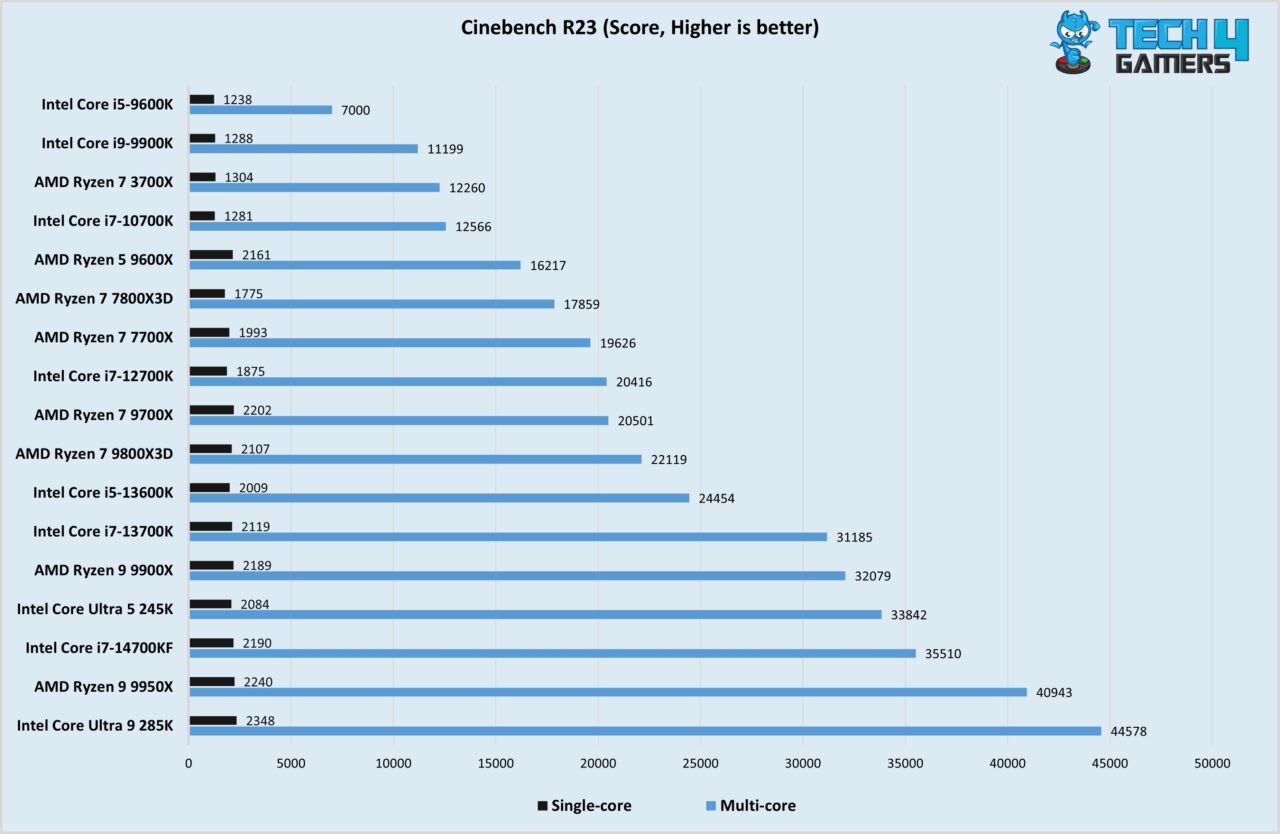
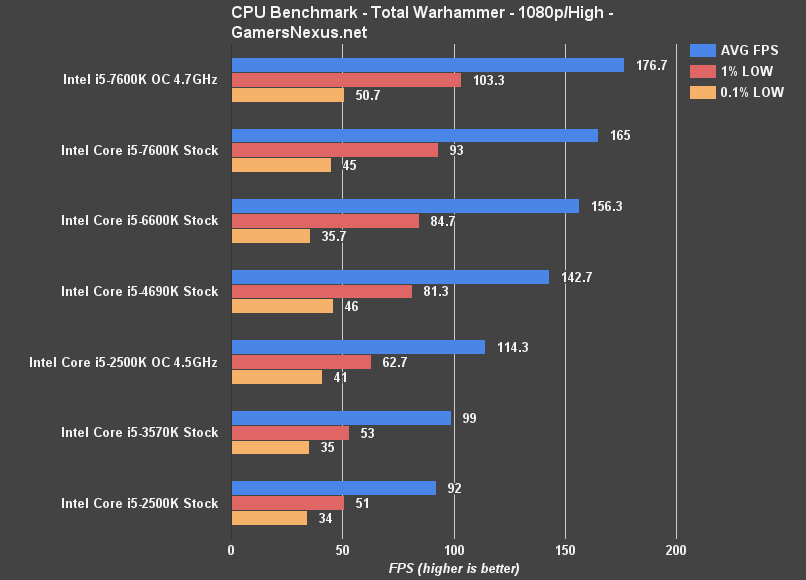
A benchmark from early 2026 indicates that even budget modern CPUs can often double the average FPS and significantly improve 1% low FPS in titles like Cyberpunk 2077 or Alan Wake 2 compared to an overclocked 7600K. This highlights the architectural leap that has occurred since the 7600K's release.
What GPU Should You Pair with an i5-7600K?
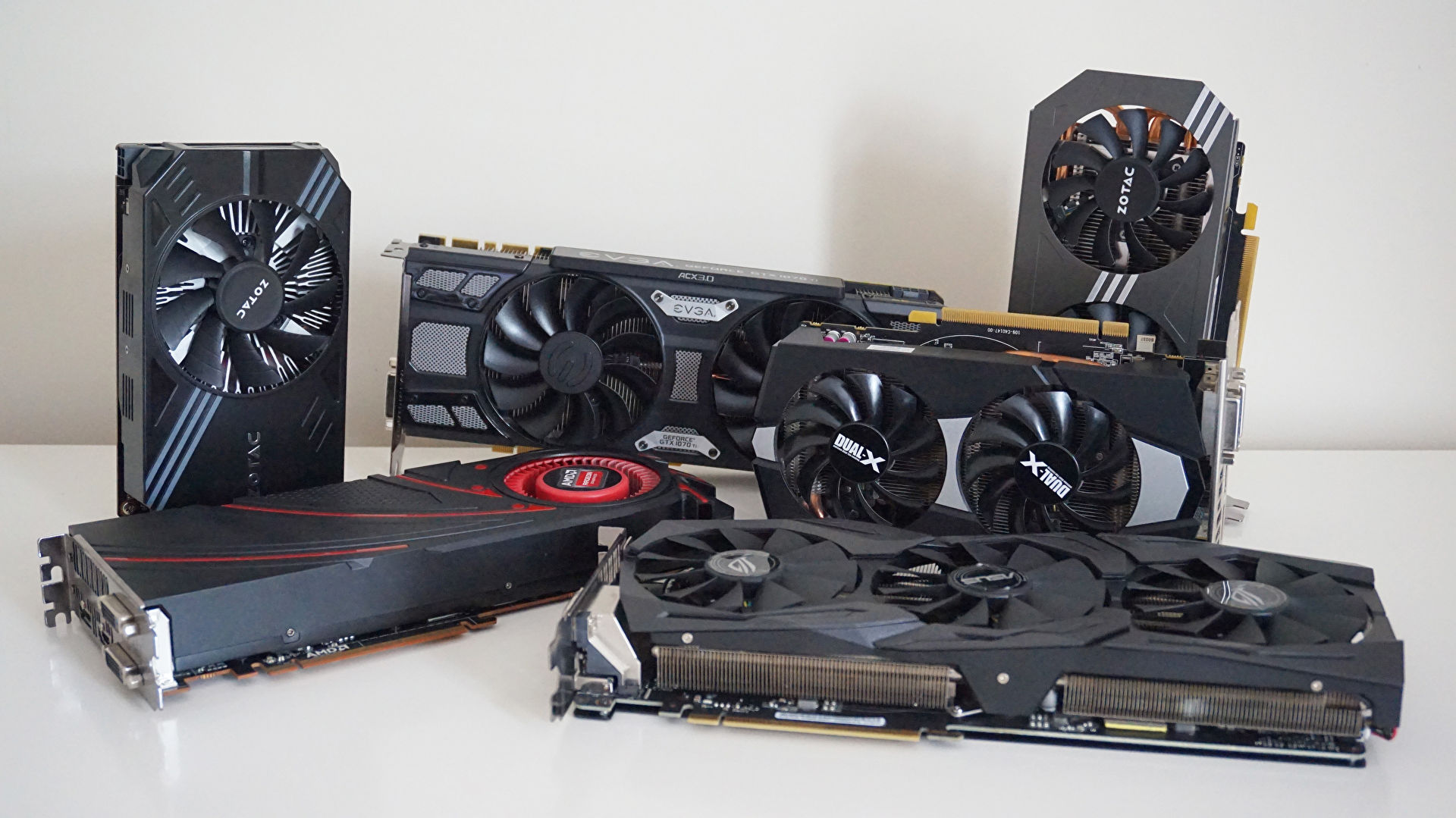
Choosing the right GPU for an i5-7600K in 2026 is about balancing performance without creating an excessive CPU bottleneck. Investing in a high-end, current-generation GPU would be largely wasted as the 7600K wouldn't be able to feed it data fast enough, leaving the GPU underutilized. Instead, focus on mid-range or older-generation GPUs that offer solid 1080p performance. Good options to consider on the used market or for budget new purchases include:
- NVIDIA GeForce RTX 3050 or GTX 1660 Super
- AMD Radeon RX 6600 or RX 580
These cards will allow you to play esports titles at high frame rates and older AAA games at 1080p with medium-to-high settings. Aiming for anything more powerful, like an RTX 4060 or RX 7600, will likely result in a significant bottleneck by the CPU, diminishing the value of the more expensive GPU. The goal is a balanced system, not one where one component is vastly superior to another.
Can Overclocking Save the i5-7600K for Today's Gaming?
Overclocking your i5-7600K can certainly provide a noticeable performance boost, potentially extending its lifespan for some games. Since the 'K' in 7600K signifies an unlocked multiplier, you can push its clock speed beyond the stock 4.2 GHz turbo frequency, often reaching 4.8 GHz to 5.0 GHz with good cooling. This extra clock speed translates directly into higher single-core performance, which is still beneficial for many games, especially those that aren't heavily threaded. However, it's crucial to understand the limitations.
Overclocking primarily boosts clock speed, not the core/thread count. While it helps mitigate the CPU bottleneck to some extent, it won't magically transform a 4-core, 4-thread CPU into a 6-core, 12-thread powerhouse. Games that heavily rely on multiple threads will still struggle, even with a high overclock. You'll also need a robust cooling solution (a decent air cooler or an AIO liquid cooler) to maintain stability and prevent thermal throttling. For gamers seeking marginal gains in specific titles, it's a viable tweak, but it's not a silver bullet for modern AAA performance.
When Is It Time to Upgrade from a 7600K System?
Knowing when to upgrade from your 7600K system is key to maintaining your gaming enjoyment and value for money. Here are clear indicators it's time to consider a change:
- Unplayable Frame Rates: If you consistently experience sub-30 FPS or severe stuttering in games you genuinely want to play, even after lowering settings, your 7600K is likely the primary culprit.
- GPU Bottleneck: You've upgraded your GPU, but your frame rates haven't improved as expected, and your CPU utilization stays at 100% while your GPU sits at 50-70%. This is a classic sign of a CPU bottleneck.
- Multi-tasking Struggles: If you enjoy streaming, running Discord, browsing, and gaming simultaneously, your 7600K will quickly show its age, making your system sluggish.
- Desire for New AAA Titles: If you want to play the latest and greatest games released this month or next year without major compromises, a 7600K simply won't cut it.
- Productivity Needs: Beyond gaming, if you use your PC for demanding tasks like video editing, 3D rendering, or heavy multitasking, a modern multi-core CPU offers a substantial improvement.
For the average gamer balancing life, upgrading means less frustration and more quality time doing what you love. Don't let old hardware turn your relaxation into a chore.
What are Budget-Friendly Upgrade Paths from the 7600K?
Upgrading from a 7600K doesn't necessarily mean spending thousands. Here are a couple of budget-friendly paths:
- Option 1: Entry-Level Modern Platform Swap This is often the most impactful upgrade. You'd replace your CPU, motherboard, and RAM. Look for combos like:
- Intel Core i3-12100F/13100F or i5-12400F
- An affordable B660/B760 motherboard
- 16GB or 32GB of DDR4 RAM (DDR5 if budget allows, but DDR4 is fine)
This path offers a significant boost in multi-threaded performance and provides a clear upgrade path for future CPUs. While it requires a bit more initial investment, it offers the best performance uplift per dollar in the long run.
- Option 2: Used i7-7700K (If You Must Stick to the Platform) If you absolutely cannot replace your motherboard and RAM, your only CPU upgrade path is to an i7-7700K. This offers 4 cores and 8 threads (thanks to Hyper-Threading), which is an improvement over the 7600K's 4 cores/4 threads. However, this is a diminishing returns option. The i7-7700K is still an old architecture and can be surprisingly expensive on the used market. It won't solve all your modern gaming problems but will offer a slight improvement in multi-threaded scenarios. Ensure your motherboard has the latest BIOS to support it.
Always check current pricing, as components fluctuate. For instance, recent trends show DDR4 memory prices have been very competitive, making platform upgrades more accessible.
Tips for Maximizing Gaming Performance on Your 7600K System.
Before you commit to an expensive upgrade, squeeze every last drop of performance from your existing 7600K system. Here's how:
- Overclock Your CPU: If you have a Z270 motherboard and adequate cooling, push your 7600K to 4.8-5.0 GHz. Research stable voltages for your chip to ensure longevity.
- Fast RAM is Crucial: Ensure you have at least 16GB of DDR4 RAM, preferably running at 3000MHz or 3200MHz, and in dual-channel configuration. Faster RAM significantly benefits Intel's Kaby Lake architecture.
- Install Games on an SSD: A Solid State Drive (SSD) won't increase your FPS directly, but it will drastically reduce load times, making your gaming experience much smoother and more enjoyable, especially in open-world games.
- Update Drivers Regularly: Keep your graphics card drivers, chipset drivers, and Windows operating system fully updated. Driver updates often include game-specific optimizations.
- Optimize In-Game Settings: This is your biggest lever. Lower CPU-intensive settings like crowd density, draw distance, physics, and shadow quality. Experiment with texture quality and anti-aliasing to find a balance between visuals and performance.
- Close Background Applications: Before launching a game, close unnecessary programs, browser tabs, and background processes to free up CPU cycles and RAM.
- Keep Your PC Clean: Physically clean out dust from your CPU cooler and GPU to ensure optimal cooling and prevent thermal throttling, especially if you're overclocking.
These steps can help make your limited gaming time more rewarding, reducing frustration and maximizing the fun you get from your hardware.
Is the 7600K a Good Choice for Social and Cozy Gaming Trends?
Yes, the Intel Core i5-7600K can be a surprisingly good choice for participating in the popular social and cozy gaming trends of 2026. Many of these games, focusing on collaboration, relaxation, and community rather than hyper-realistic graphics or demanding physics, are far less CPU-intensive. Titles like Palia, Minecraft, Valheim, or various indie co-op games don't stress the CPU as much as a new AAA shooter. For these experiences, where socializing on Discord or playing with friends is key, the 7600K paired with a modest GPU can deliver excellent frame rates and a smooth, enjoyable experience. The focus here isn't pushing graphical limits, but on engaging gameplay and connectivity, which the 7600K can still facilitate effectively. This aligns perfectly with the needs of gamers balancing life who value fun and social interaction over raw graphical power.
In conclusion, while the Intel Core i5-7600K is no longer a powerhouse for cutting-edge AAA gaming in 2026, it still holds value for specific types of gamers and game libraries. It excels in esports, older titles, and the growing market of social and cozy games. Understanding its limitations and applying smart optimizations, including potential overclocking and careful GPU pairing, can extend its usability. When it's time to upgrade, budget-friendly modern platforms offer a significant leap in performance per dollar, ensuring your valuable gaming time is always enjoyable and frustration-free. What's your biggest gaming challenge with your current setup? Comment below and let's help each other out!
FAQ Section
Is the i5-7600K good for streaming?
The i5-7600K is generally not good for streaming modern games. Its 4-core, 4-thread design struggles to simultaneously handle both gaming and encoding the video stream, leading to significant performance drops, stuttering, and poor stream quality. For any serious streaming, a CPU with more cores and threads (like a 6-core/12-thread or 8-core/16-thread processor) is highly recommended.
Can the 7600K run Cyberpunk 2077?
Yes, the 7600K can technically run Cyberpunk 2077, but not well. You'll likely experience very low frame rates (often below 30 FPS, even at low settings and 1080p), significant stuttering, and an overall poor experience due to the game's heavy reliance on multi-core performance. It's playable in the loosest sense, but far from enjoyable, even for patient gamers.
What motherboard works with a 7600K?
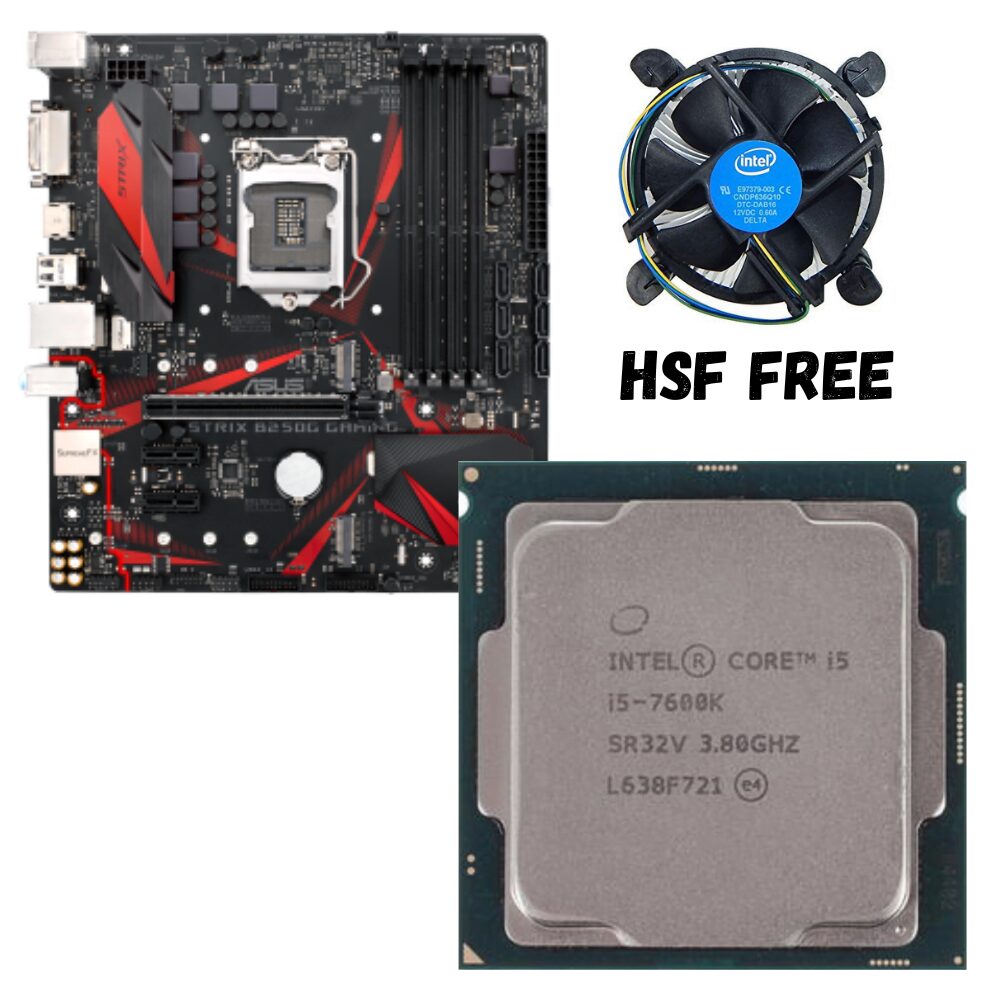
The Intel Core i5-7600K uses the LGA 1151 socket and is compatible with Intel 100-series (e.g., Z170, H170, B150) and 200-series (e.g., Z270, H270, B250) chipsets. For overclocking the 7600K, a Z170 or Z270 motherboard is required, as these chipsets allow CPU multiplier adjustments. Ensure your motherboard BIOS is updated to support Kaby Lake CPUs.
Is 16GB RAM enough with a 7600K for gaming?
Yes, 16GB of DDR4 RAM is generally enough and recommended for gaming with a 7600K. Most games in 2026 will run fine with 16GB. However, ensure it's running in a dual-channel configuration and at a decent speed (3000-3200MHz is ideal for this platform) to get the best performance, as faster RAM significantly helps the Kaby Lake architecture.
Does a better GPU help a 7600K bottleneck?
A better GPU can help a 7600K bottleneck in some scenarios, but only up to a point. If your current GPU is very weak, upgrading it will yield performance gains. However, if you pair a high-end modern GPU with a 7600K, the CPU will become the primary bottleneck, unable to feed the GPU enough data, resulting in underutilization of the powerful GPU and limiting overall FPS gains. A balanced approach with a mid-range GPU is best.
What are common 7600K gaming issues?
Common 7600K gaming issues include low minimum frame rates, frequent stuttering, and inconsistent performance, especially in CPU-intensive modern titles. High CPU utilization (often at 100%) during gameplay is a tell-tale sign of a bottleneck. These issues often lead to a less immersive and frustrating gaming experience, prompting many gamers to consider upgrades for smoother play.
7600K Struggles with modern AAA titles due to 4 cores/4 threads. Excels in esports and older games. Requires strong GPU pairing to mitigate bottlenecks. Overclocking provides some boost. Budget upgrade paths are available for better performance. Not ideal for streaming or multi-tasking.
35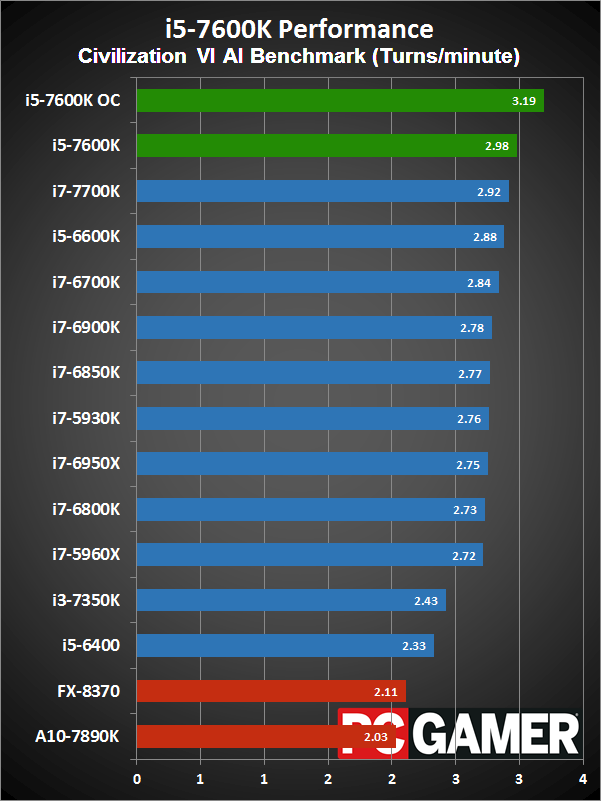
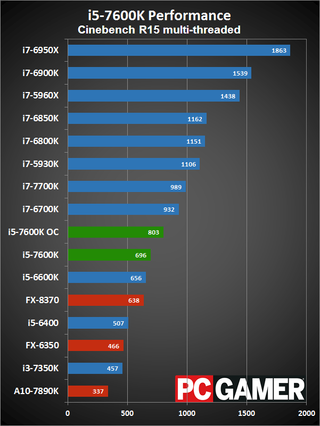


Intel Core I5 7600K Review PC Gamer . Intel Core I5 7600K Review PC Gamer 320 80 . Core I5 7600K Review The Best Gaming CPU YouTube . Intel Core I5 7600K Stock Vs 4 8GHz Overclock Gaming Benchmarks YouTube . I5 7640X Vs I5 7600K Vs I7 7700K Comparison WorkStation And Gaming
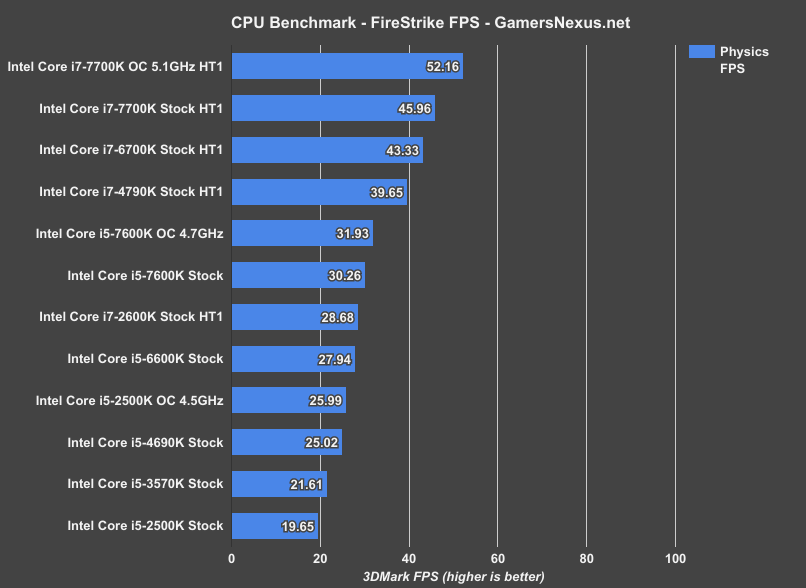


Intel I5 7600K Review Ft 5 Generations Of I5 I7 CPUs GamersNexus I5 7600k 3dmark Fps . I5 4690k Vs I5 7600k Test In 7 Games YouTube . Intel Core I5 7600K GIGABYTE GTX1080 XTREME GAMING 1449365. Core I5 7600K Stock 4 2GHz Vs Core I5 6600K 2500K Gaming Benchmarks . Intel Core I3 8350K 4 0GHz Vs I5 7600K 3 8GHz 20 Games Benchmark

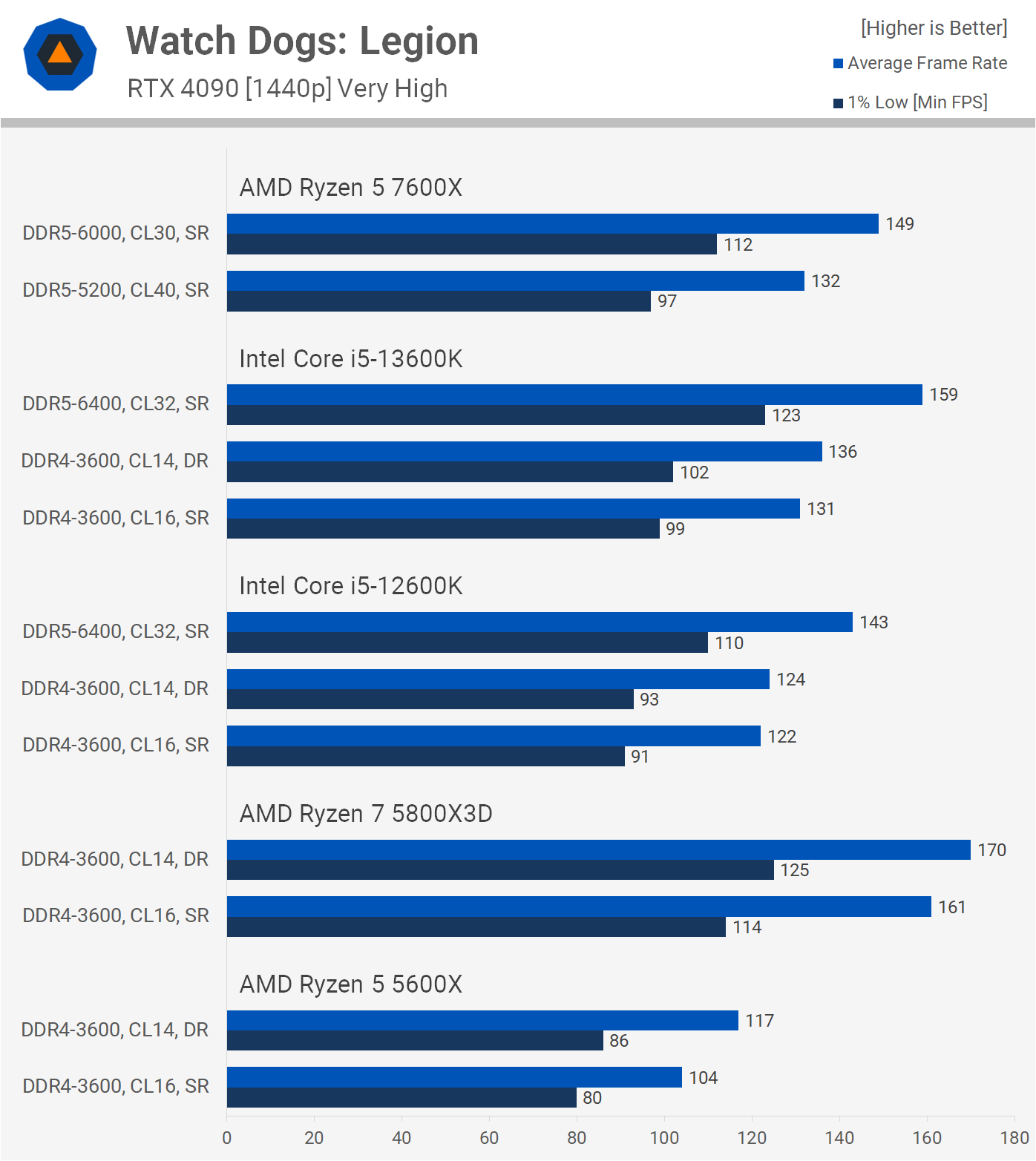

I5 7600K Vs I5 8600K Vs I5 9600K Stock And Overclock New Games . The Best Value Gaming CPU 13600K Vs 12600K Vs 7600X Vs 5800X3D Vs WDL 1440p . Procesor Intel Core I5 7600k Test I Opinia Instalaton Pl DSC 6184 1248x702 . Intel I5 7600K GTX 1070 32GB DDR4 Gaming PC Jawa. Gaming PC I5 7600k GTX 1060 16GB RAM Computers Tech Desktops On Gaming Pc I57600k Gtx 1060 16g 1677910085 9eb0b95a Progressive

AMD Ryzen 7600 Integrated Gaming Performance No GPU Tech Overwrite Summing Up The FPS Benchmark Results On My Homelab NAS When Playing Five Different Games On The Ryzen 7600 CPU 1024x556 . Insane Value Best Ryzen 7600X Gaming PC Build 2024 RAM GPU . Intel Core I7 7700K In 2026 Gaming Performance Bottlenecks 7700k Vs Modern Cpu Performance. Intel I5 7600K GTX 1070 32GB DDR4 Gaming PC Jawa. Is Ryzen 5 7600 Good Ryzen 5 7600 Review Non X WePC Gaming Performance 7600x Vs 7600


Best Gaming PC Builds For 2026 Best Gaming PC Builds For 2026.webp. 13 Best GPUs For Gaming 2026 Top Graphics Cards Ranked Banner 5. Best Budget Gaming Laptops 2026 Top Value Picks Best Budget Laptops For Gaming 2026 . Best Budget Gaming Setup In 2026 Full Guide For Beginners Budget Friendly Gaming Setup In 2026 . Best Budget CPUs In 2026 With Gaming Benchmarks Intel Core Ultra 5 245K Cinebench R23 Test Image By Tech4Gamers 1280x834


Best Gaming Laptops At CES 2026 RTX 5090 Options Dual Screen Picks Lenovo Legion Pro Rollable Concept. Intel Core I7 7700K In 2026 Gaming Performance Bottlenecks 6 Best GPUs For AI And Deep Learning In 2026.webp. Headset Gaming Terbaik 2026 Inovasi Audio Imersif GAMES GG Top Gaming Headsets For 2026 59c0382d8b . Gaming PC I5 7600k GTX 1060 16GB RAM Computers Tech Desktops On Gaming Pc I57600k Gtx 1060 16g 1677910085 109a6960 Progressive. Xbox Game Showcase 2026 Trailers Release Dates TAFT Independent 2026 Video Game Release Dates Post Feature Image

Intel Core I5 7640X Vs I5 7600K Test In 5 Games Full HD YouTube . I7 7700K Vs I5 7600K Benchmarks Gaming Test 4K YouTube . Best GPU For Gaming 2026 Guide Sirius Power PC Buyserver Blog One . I5 7600K 7TH GEN MOTHERBOARD PROCESSOR ASUS ROG B250G GAMING I5 7600k 7th Gen Motherboard Processor Asus Rog Strix B250g Gaming . Intel I5 7600K Review Ft 5 Generations Of I5 I7 CPUs GamersNexus I5 7600k Totalwar Benchmark