Navigating the vast universe of Roblox can be an exciting adventure, yet for many adult gamers balancing work, family, and personal gaming time, understanding what is roblox age rated is a top priority. With millions of user-generated experiences, Roblox presents a unique challenge in content moderation and age appropriateness. This guide is designed to empower you with comprehensive knowledge, cutting through the noise to help you confidently select games for yourself or your family. We will explore Roblox's rating systems, delve into parental control features, and provide actionable advice to ensure a safe and enjoyable gaming environment. Discover how to effectively manage content, identify appropriate experiences, and utilize the tools available to optimize your Roblox journey, making informed decisions that align with your lifestyle and family values. Stay current without the hype, and make every gaming moment count on Roblox.
What exactly does "Roblox age rated" mean for my family?
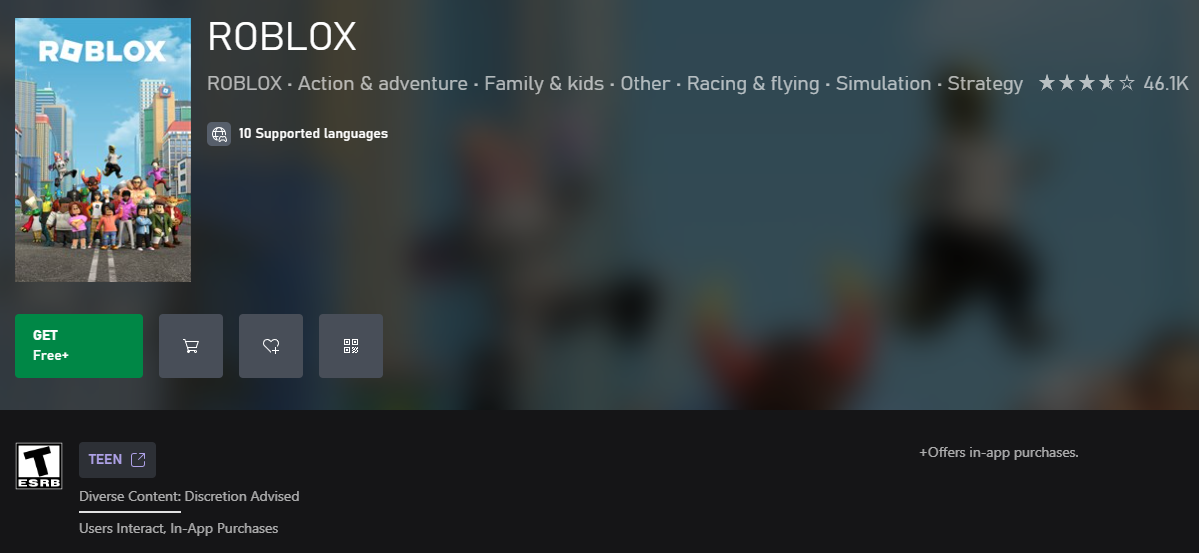
The term "Roblox age rated" refers to the various guidelines and systems Roblox uses to categorize content on its platform. The platform itself is rated E10+ by the ESRB. However, individual games or "experiences" within Roblox have their own Experience Guidelines (All Ages, 9+, 13+, 17+) based on content like violence, gore, and mature themes. For your family, this means while the core platform is generally suitable, you need to check the specific guidelines for each game to ensure it's truly age-appropriate for your children and aligns with your family's values.
How do Roblox's age ratings work compared to traditional game ratings?
Traditional game ratings (like ESRB on console games) apply to a singular, static product. Roblox is different because it's a dynamic platform primarily hosting user-generated content (UGC). While the platform gets an ESRB rating, Roblox's internal "Experience Guidelines" are more akin to content descriptors you'd find on movies or TV, categorizing specific in-game content. This allows for more granular control over the diverse content landscape, unlike a single rating for an entire console game, helping busy parents navigate options quickly.
Is Roblox genuinely safe for all ages, or are there hidden dangers?
Roblox is designed with safety features like robust chat filters, parental controls, and a moderation team. However, due to its user-generated nature, the quality and appropriateness of content can vary significantly. While it strives to be safe for all ages, potential dangers can include exposure to unmoderated user interactions, mis-rated content, or subtle in-game purchases. By actively using parental controls, monitoring activity, and having open discussions, you can significantly enhance the safety and suitability of the platform for your family, turning potential dangers into manageable risks.
What parental controls does Roblox offer for different age groups?
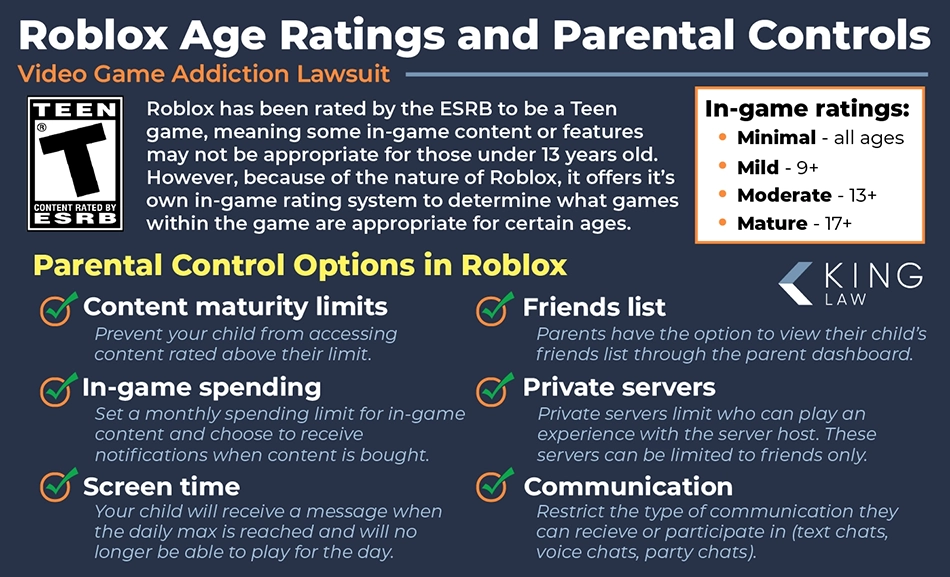
Roblox offers a comprehensive suite of parental controls adaptable for various age groups. Key features include Account Restrictions, which limit access to experiences based on age guidelines (e.g., All Ages or 9+). You can also set monthly spending limits for Robux, manage who can chat with your child, control privacy settings like friend requests, and secure account changes with a PIN. These tools empower adult gamers to tailor the Roblox experience, ensuring that younger players only encounter content appropriate for their developmental stage, and older children have more freedom within safe boundaries.
How can I find age-appropriate games on Roblox for my child or myself?
Finding age-appropriate games on Roblox is straightforward with a few key steps. First, ensure parental controls are activated to filter out higher-rated content. Then, use the platform's search filters to browse experiences by their Experience Guidelines (e.g., "All Ages" or "9+"). Look for popular genres generally considered safer, like "obbys" (obstacle courses), non-violent simulation games, or creative building experiences. Always read game descriptions, check user reviews, and even watch a short gameplay video to get a sense of the content before committing, especially for new or less familiar titles.
What is the official age rating for the Roblox platform itself?
The core Roblox platform is officially rated E10+ by the ESRB (Everyone 10+) in North America. This rating is for the platform itself, meaning the tools and framework. However, individual experiences (games) *within* Roblox can have varying ratings. This is crucial to understand as a gamer or parent, as the overall platform rating doesn't directly apply to every game.
How do Roblox experience guidelines differ from standard ESRB ratings?
Roblox uses its own Experience Guidelines system, alongside global age ratings like ESRB, PEGI, and USK. These guidelines categorize content based on violence, gore, mature themes, and unmoderated user chat. While standard ratings apply to the platform, the internal guidelines help users understand specific game content. This offers a more granular look than just the broad platform rating.
What steps can I take to ensure my child only accesses age-appropriate content on Roblox?
As a busy adult gamer juggling responsibilities, keeping tabs on kid's game choices can be tough. Roblox provides robust parental controls. You can set account restrictions via the Settings menu, limiting access to experiences based on their Experience Guidelines. Enabling Account Restrictions means your child can only join pre-approved experiences. Always review the specific content descriptors for each game.
Is it possible for users to bypass Roblox's age rating systems?
While Roblox implements strict security and content moderation, no system is entirely foolproof, especially with user-generated content. Players might occasionally encounter content that slips through filters or find workarounds. However, Roblox consistently updates its moderation tools and encourages users to report inappropriate content immediately. Staying engaged and using parental controls is key.
What should I do if I find content on Roblox that seems mis-rated or inappropriate?
If you come across content you believe is mis-rated or violates Roblox's Community Standards, it's vital to report it. Every experience page has a "Report Abuse" button. This helps Roblox's moderation team review and take action. Providing detailed information aids in faster resolution. Your input contributes to a safer environment for all players, reflecting real community responsibility.
How does user-generated content (UGC) impact Roblox's age rating challenges?
Roblox's vast library is almost entirely user-generated, meaning millions of creators develop games daily. This makes comprehensive content review a monumental task. While Roblox uses automated tools and human moderators, the sheer volume can lead to content varying wildly in quality and appropriateness. This highlights why active parental involvement and understanding "what is roblox age rated" are more important than ever.
Are there specific game genres or types of experiences on Roblox that are generally safer for younger players?
Generally, experiences labeled with "All Ages" or "9+" in Roblox's Experience Guidelines tend to be safer. These often include obbys (obstacle courses), simulation games, role-playing games focused on non-violent activities (like Adopt Me or MeepCity), and creative building games. Look for experiences with high ratings and positive reviews from other parents and players, but always check the content descriptors yourself.
As a busy adult gamer, you know the struggle: finding time to relax with a good game, maybe even sharing that passion with your family. But when it comes to platforms like Roblox, with its seemingly endless universe of user-created games, a common question pops up: "what is roblox age rated"? It's not just about a single number; it's about navigating a dynamic, ever-changing world of experiences. You want to ensure that your precious gaming moments, or those of your children, are safe, fun, and age-appropriate without hours of research. This guide cuts through the complexity, offering clear, actionable insights into Roblox's age ratings and how to leverage them, giving you back valuable time and peace of mind. We're talking practical solutions for real gamers, balancing life and play, keeping current with gaming trends without the usual hype.
Did you know that 87% of US gamers play regularly, often dedicating 10+ hours a week, and many juggle this with demanding jobs and family life? With mobile gaming dominating and social play trending this month, Roblox stands out as a colossal social platform. Understanding its age ratings is no longer optional; it's essential for smart gaming. This article will equip you with the knowledge to manage content, optimize your family's Roblox experience, and ensure every click is a step towards fun, skill-building, and safe social interaction. Let's dive in and demystify Roblox's age ratings, addressing common pain points like inappropriate content concerns and effective parental oversight.
What is Roblox Age Rated and What Does it Mean?
Roblox as a platform is officially rated E10+ by the ESRB (Everyone 10+) in North America. This rating indicates that the core application and its general features are suitable for ages 10 and up, often containing mild cartoon violence or minimal suggestive themes. However, this is a crucial distinction: the E10+ rating applies to the *platform itself*, not every single game or "experience" created by its users. Because Roblox hosts millions of user-generated experiences, each individual game can have its own specific content considerations. For adult gamers managing family time, this means you can't rely solely on the overall platform rating when choosing specific games.
To address the diversity of content, Roblox also employs its own Experience Guidelines system, categorizing individual games. These guidelines help users understand what kind of content to expect within a particular experience, including violence, gore, mature themes, and unmoderated user chat. It's a layer of information designed to help you make informed decisions, especially when you're short on time but keen to ensure appropriate content for everyone in your household.
How Does Roblox Determine Age Ratings for its Experiences?
Roblox utilizes a multi-faceted approach to assign age ratings or Experience Guidelines to the millions of user-created games on its platform. This process combines creator-provided information, automated moderation tools, and human review. When a creator publishes an experience, they must provide details about its content, including levels of violence, presence of blood/gore, realistic depictions of crime, use of drugs/alcohol, and mature themes. This self-declaration forms the initial basis for the guideline.
These submissions are then cross-referenced by Roblox's advanced AI moderation systems, which scan for keywords, images, and other indicators of content. A team of human moderators also reviews a portion of experiences, especially those flagged by users or automated systems, to ensure accuracy. While this system is robust, the sheer volume of new content daily means some things may occasionally slip through. This is why active engagement and understanding these guidelines are so important for adult gamers seeking a balanced approach to their family's digital entertainment.
What Specific Content Falls Under Different Roblox Age Categories?
Roblox's Experience Guidelines typically categorize content into tiers, helping users and parents quickly gauge suitability. The main categories include:
- All Ages: This category is for experiences generally suitable for everyone. Content is usually very mild, focusing on creative play, social interaction, or simple challenges. Think obstacle courses (obbys), non-violent simulations, or building games.
- 9+: Experiences in this category may contain mild violence (e.g., cartoonish explosions, simulated combat without realistic injury), infrequent or mild realistic blood, or slightly more complex themes. Chat is usually unmoderated but subject to Roblox's filtering.
- 13+: These experiences might include moderate violence, more frequent or realistic blood, stronger mature themes (without explicit content), or references to drugs/alcohol in a non-glamorized way. User-generated content and interactions can be more complex, aligning with the maturity of older pre-teens and early teenagers.
- 17+: This is the newest and most restricted category, designed for experiences that may feature intense violence, realistic gore, strong language, mature suggestive themes, or gambling simulations. Access to 17+ experiences is restricted to verified users who are 17 years or older, mirroring trends in more mature gaming content for older audiences.
These categories are critical for adult gamers balancing work and family, providing a quick reference to decide if an experience is appropriate for their children or even for their own relaxation time, avoiding unexpected content.
Are Roblox's Age Ratings Reliable for All Games?
While Roblox makes significant efforts to implement and enforce its Experience Guidelines, the reliability can sometimes vary due to the platform's unique nature: it's almost entirely driven by user-generated content (UGC). Millions of new experiences and updates are published constantly, making comprehensive real-time human review a monumental task. Roblox relies heavily on automated filters, AI, and community reporting to manage this volume.
This means that while the vast majority of content aligns with its rating, some experiences might occasionally be mis-categorized or contain elements that push the boundaries of their assigned guideline. For the average gamer who values performance and reliability, this means a degree of vigilance is still required. Think of it like this: an experienced gamer wouldn't buy a new game without checking reviews. Similarly, a quick glance at an experience's description, user reviews, and content descriptors (if available) can offer additional reassurance. Regularly monitoring your child's in-game activity, a common practice among adult gamers today, remains the most effective safeguard.
How Can Adult Gamers Effectively Use Roblox Parental Controls?
For adult gamers balancing multiple responsibilities, Roblox's parental controls are your best ally for ensuring a safe and appropriate experience for younger players. These features are designed to give you granular control without requiring constant supervision.
Here's how to maximize them:
- Account Restrictions: Found in the Settings menu under Parental Controls, this feature allows you to limit your child's account to only accessing experiences that Roblox has approved as appropriate for "All Ages" or specific age categories. This is a powerful tool to prevent access to potentially mature content.
- Monthly Spending Limits: If your family enjoys the occasional in-game purchase, you can set a monthly spending limit for Robux. This helps manage budgets and prevents accidental overspending, a common concern for many adult gamers.
- Chat and Communication Settings: Adjust who can chat with your child (friends, friends of friends, or nobody) and what types of messages they can send. Roblox also has robust text filtering for offensive language, but these communication settings add another layer of protection.
- Privacy Settings: Control who can send messages, join private servers, or see your child's inventory. These settings are crucial for managing social interactions and privacy.
- Account PIN: Set a PIN to prevent unauthorized changes to account settings. This ensures that the parental controls you've set cannot be easily bypassed by a savvy youngster.
Using these controls effectively ensures that your family's Roblox experience remains aligned with your values, allowing for stress-free relaxation and fun.
What Are the Best Practices for Monitoring Roblox Activity?
Monitoring Roblox activity goes beyond just setting parental controls; it involves a proactive approach that fits into your busy schedule. For adult gamers, this means a blend of technology and communication.
Consider these best practices:
- Regular Check-ins: Have open conversations with your child about what they're playing, who they're playing with, and what they enjoy. This not only builds trust but also gives you insights into their digital world.
- Use the Account's Recent Activity: Roblox accounts have a "My Feed" or "Friends" section where you can see recent games played. For parental accounts, you can often view your child's playtime and recently visited experiences.
- Join Them Occasionally: Play a game with your child once in a while. It's a great way to bond, understand the game's content firsthand, and see their interactions with others. This also helps you understand popular trends, like the current social/cozy games, that might be engaging them.
- Leverage Reporting Tools: Teach your child how to report inappropriate content or behavior. Roblox has a clear "Report Abuse" button on every experience page and user profile. Empowering them to be part of the solution fosters a safer community.
- Stay Informed: Periodically check Roblox's official blog or news for updates on safety features, content moderation, and new parental tools. Staying current with these changes, without getting caught up in hype, ensures you're always using the most effective strategies.
Balancing these monitoring techniques allows you to be an engaged parent without hovering, promoting responsible digital citizenship.
Can I Play Roblox Games with My Kids Regardless of Age Rating?
Absolutely! Many adult gamers find joy in sharing their hobby with their children, and Roblox offers a fantastic platform for cross-generational play. While understanding
Roblox age rating overview, ESRB and Experience Guidelines explained, parental control features, understanding user-generated content safety, age recommendations for experiences, content filtering importance, monitoring Roblox activity, in-game purchase awareness, reporting inappropriate content.
35
Ultimate Roblox Age Guide March 2026 Safety First Roblox Age Guide . What Is The Roblox ESRB Rating For Young Gamers And Parents . Roblox Steps Up Age Checks And Groups Younger Users Into Age Based Chats Poster . Roblox Moves Ahead With Age Specific Accounts For Kids 04 14 2026 Untitled Drawing 2026 04 RVJ2dS9 . Roblox Age 2026 Slide 1822



2026 Parental Guide For Roblox Usage UnicMinds 2026 Parental Guide For Roblox Usage UnicMinds . A New Era Of Safety Facial Age Checks Now Required To Chat On Roblox. Roblox Age Chat March 2026 KreekCraft S Warning Roblox Age Chat 1024x559 . How To Add An Age Maturity Rating To Your Roblox Game YouTube . How To Get Age Rating On Your Roblox Game YouTube


Roblox Games Have AGE RATINGS YouTube . Roblox Launches New Age Based Accounts For Users Under 16 And Expands Roblox3 . Roblox Age Rating Canada . Roblox Whats The Right Age To Start Playing Screen Shot 2022 08 23 At 10.55.11 AM . Roblox Age Rating Canada


Roblox Age Rating Canada . What Is The Roblox ESRB Rating For Young Gamers And Parents Roblox XBOX . Roblox Introduces New Age Based Accounts And Expanded Parental Controls. How To Change Age Group On Roblox In 2026 Update YouTube . What Is The Roblox ESRB Rating For Young Gamers And Parents 1200x1769



Age Gating Goes Mainstream What Roblox S New Teen Rules Mean For Marketers 288879. What Is Garhorse Roblox And Why Is It Popular In 2026 Updated Roblox. Roblox Age Rating Explained How To Keep Your Kids Safe Official Roblox Age Rating . Roblox Age Rating Canada . Roblox Experiences Will Now Have IARC Age Ratings Age For Roblox Gets IARC Age Ratings And Age For In Game Chat

Roblox Age Check What It Is Why It Matters How To Complete It Image. What Is The New Roblox Age Ratings For Games YouTube . Roblox Age What Parents Need To Know. Roblox Age Guide To Ratings And Safety Roblox Age And 5.webp. Roblox Age Guide To Ratings And Safety Roblox Age Learn About Age And
Is Roblox Banning Adults Truth About 2026 Age Featured Image 7ew9azg6 300x210 . Petition Stop Roblox S Age Based Chat United States 1600x900 NoPad . Roblox Adds Global Age Roblox Now Mandates Facial Age Checks To Chat.webp. Roblox Has Its Most Productive Year Ever According To The Company . Roblox Age Rating Canada Parental Controls In Roblox And Content Maturity 1.webp