Ever wonder where all your Robux went? Keeping track of in-game spending is crucial for many US gamers, especially those balancing virtual worlds with real-world responsibilities. Understanding how to see your Roblox purchase history empowers you to manage your budget, monitor account activity, and ensure family gaming habits align with financial goals. With an estimated 87% of US gamers engaging regularly and many spending 10+ hours a week across various platforms, often involving in-game purchases, knowing these steps is more important than ever. This guide provides clear, step-by-step instructions for checking your Roblox transaction records, whether you're on PC, mobile, or managing a child's account. We'll cover everything from Robux purchases to item acquisitions, helping you quickly gain clarity and control over your digital spending. Staying current with your spending habits helps optimize your gaming experience and ensures value for money without unnecessary hype. Let's dive in and demystify your Roblox spending.
How do I check my Robux spending history on Roblox?
To check your Robux spending history, log into the Roblox website, click the Robux icon (R$) at the top right, and then select 'My Transactions.' Navigate to the 'Robux Spent' tab to see a detailed list of all items, game passes, and developer products you've purchased using Robux, along with transaction dates and amounts.
Where can I find my Roblox transaction log for game passes?
Your Roblox transaction log for game passes is located within the 'My Transactions' section of your account on the Roblox website. After logging in, click the Robux icon and choose 'My Transactions.' Under the 'Robux Spent' tab, you'll find every game pass purchase listed with the item name, date, and Robux amount spent.
Is it possible to view Roblox purchases made years ago?
Yes, Roblox typically allows you to view purchase history going back several years. On the 'My Transactions' page, you can use the date filter options, often including an 'All Time' selection, to review past Robux acquisitions and spending from when your account was created.
How can parents monitor a child's Roblox purchase history?
Parents can monitor a child's Roblox purchase history by logging into the child's Roblox account on the website. From there, navigate to 'My Transactions' via the Robux icon. This section provides a clear overview of all Robux bought and spent, enabling effective parental oversight.
What if an item I bought on Roblox isn't in my inventory?
If a Roblox item isn't in your inventory after purchase, first verify the transaction in your 'Robux Spent' history. If confirmed, wait a few minutes as sometimes there's a delay. If it's still missing, contact Roblox Support with the transaction details, including date and item name, for assistance.
Can I track real money spent on Robux directly through Roblox?
Yes, when you view your 'My Transactions' history on the Roblox website, the 'Summary' or 'Robux Earned' tab (depending on where the Robux originated) will often display the real money equivalent spent on Robux packages. This allows you to track your actual cash outlay for the virtual currency.
Why is my Roblox purchase history important for account security?
Your Roblox purchase history is vital for account security as it allows you to quickly identify any unauthorized transactions. Unexpected purchases could indicate a compromised account, prompting you to change your password, enable two-step verification, and contact Roblox Support to secure your account and report fraudulent activity promptly.
Welcome, fellow gamers! Ever find yourself scratching your head, wondering where all your hard-earned Robux or recent in-game purchases have gone? You are not alone. For many of us balancing demanding jobs, family commitments, and a passion for gaming, keeping tabs on digital spending is a practical necessity. The average US gamer, often around 36 years old and spending over 10 hours a week across various platforms, values smart spending and transparency. Roblox, with its vast universe of user-created content and enticing in-game items, can sometimes make it tricky to track every transaction. But don't fret! This guide is designed to empower you with the knowledge to easily view your Roblox purchase history, giving you peace of mind and better control over your gaming budget. We'll walk through exactly how to see your Roblox purchase history, ensuring you get the most value out of your gaming time and money.
Understanding your purchase history is not just about budgeting; it's about account security, recognizing spending patterns, and even troubleshooting missing items. Whether you're a seasoned Roblox player, a parent managing a child's account, or simply curious about past expenditures, knowing where to look is key. Let's dive into the practical steps and commonly asked questions to make reviewing your Roblox transactions a breeze.
How Do I Access My Roblox Purchase History on PC?
Accessing your Roblox purchase history on a PC is straightforward and can be done through your web browser. This method provides the most comprehensive view of your transactions, including both Robux purchases and in-game item acquisitions. Follow these steps:
Log in to Roblox: Open your preferred web browser (Chrome, Firefox, Edge) and go to the official Roblox website (www.roblox.com). Enter your username and password to log in to your account.
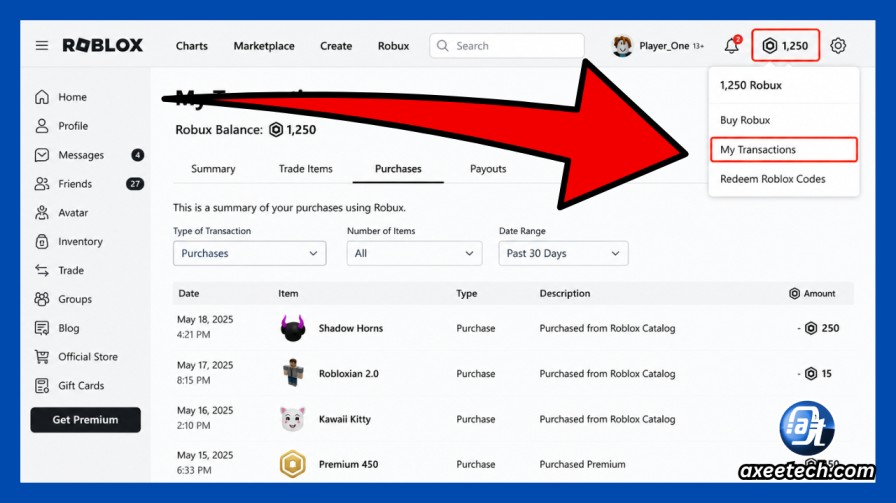
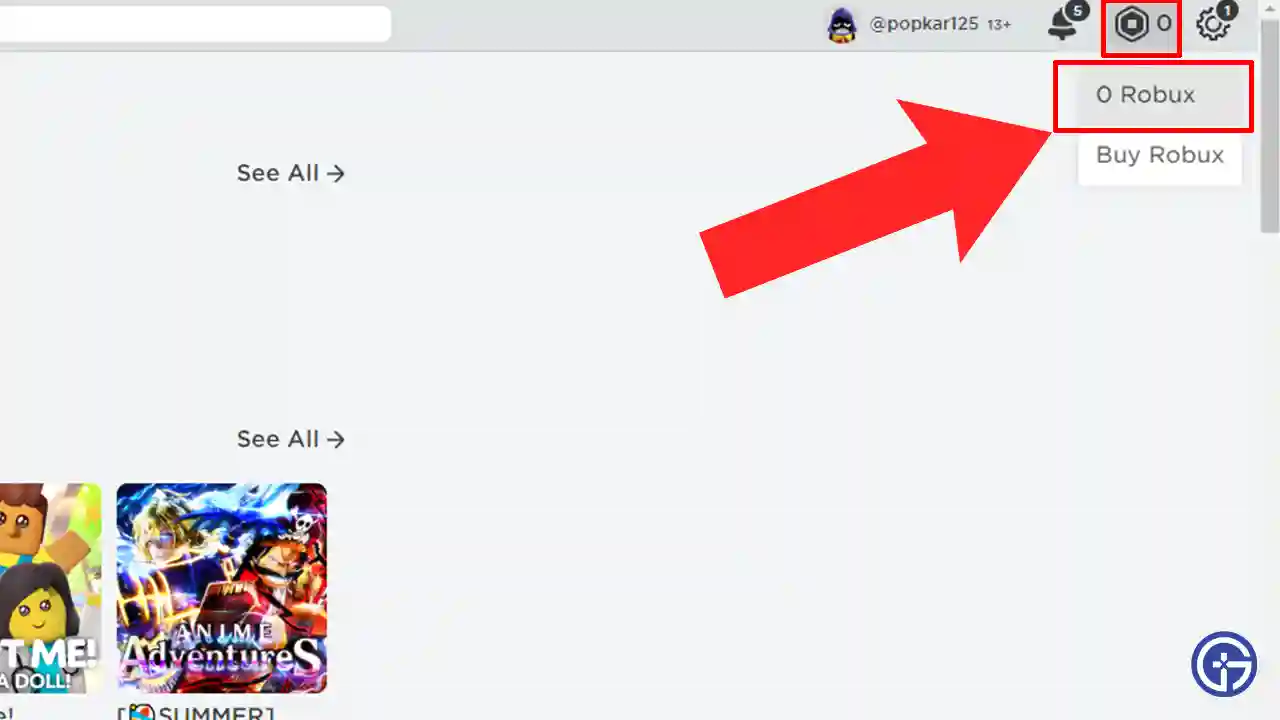
Navigate to the Robux Section: Once logged in, look for the Robux icon (the hexagonal R$) located at the top right corner of the page. Click on it. This will typically display your current Robux balance.
Open the Transactions Page: Below your Robux balance, you'll see an option like "My Transactions" or "Robux" with a small dropdown arrow. Click on this, then select "My Transactions" from the menu that appears. Alternatively, you can often click directly on your Robux balance to be taken to a summary page, then look for "My Transactions" there.
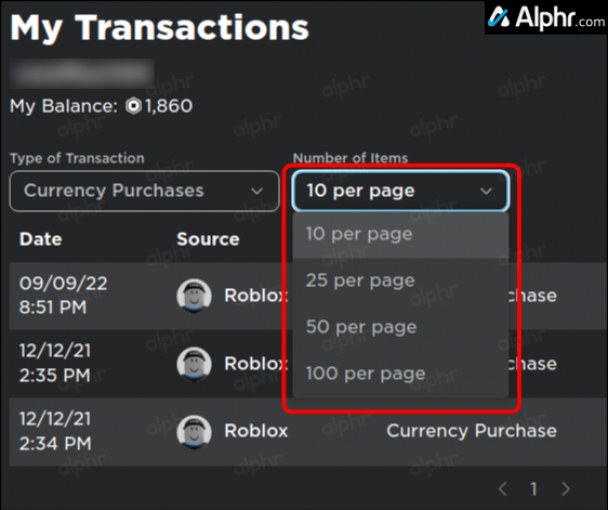
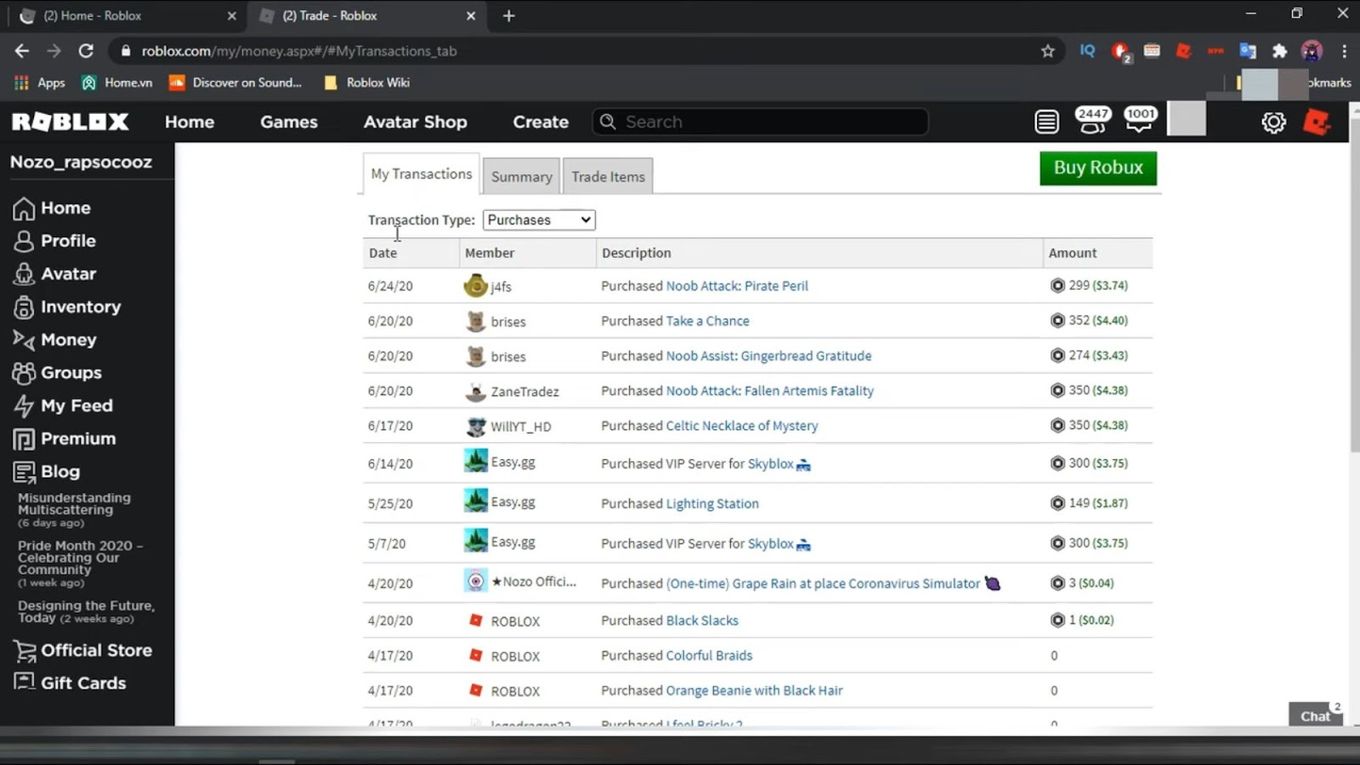
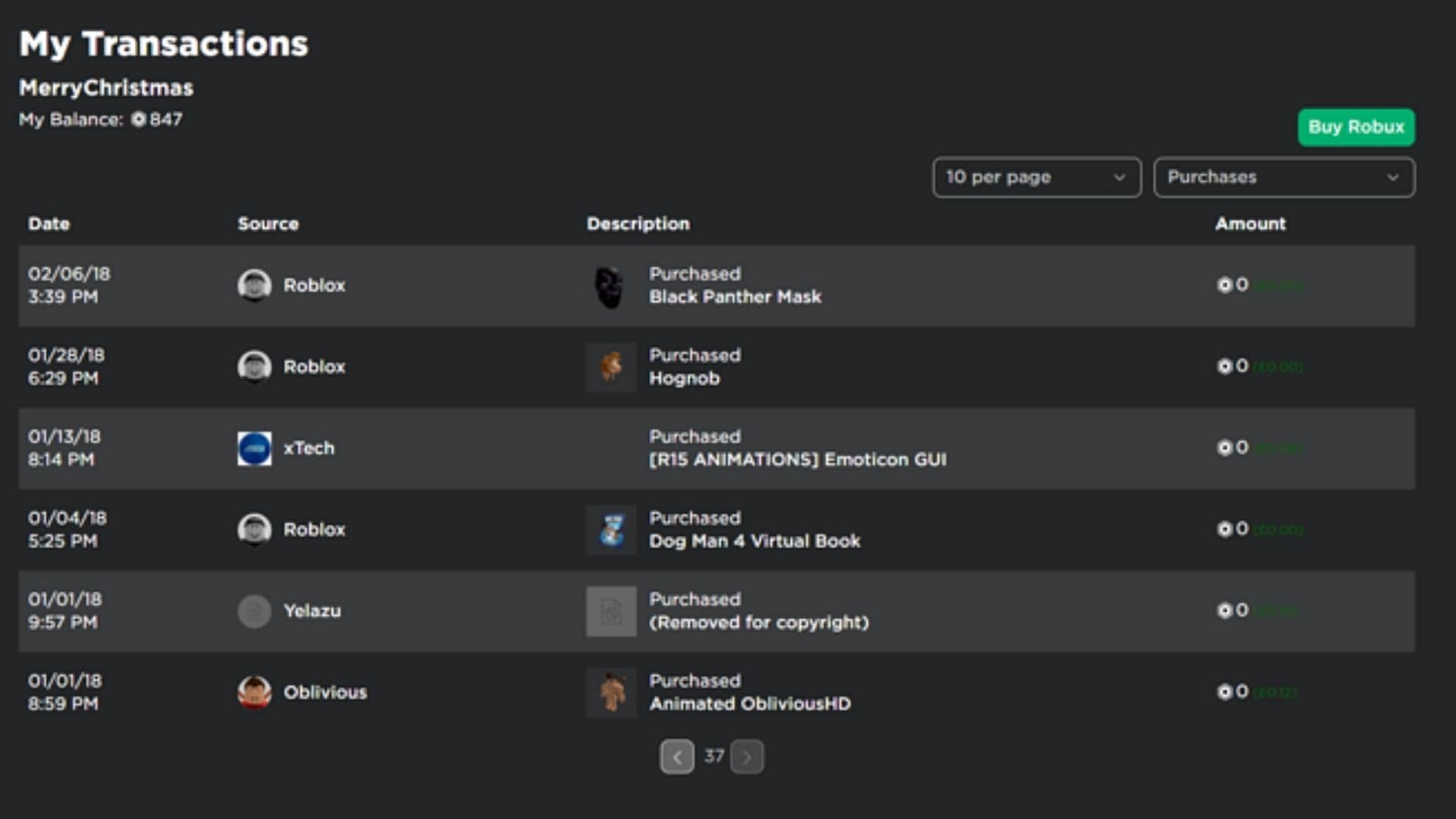
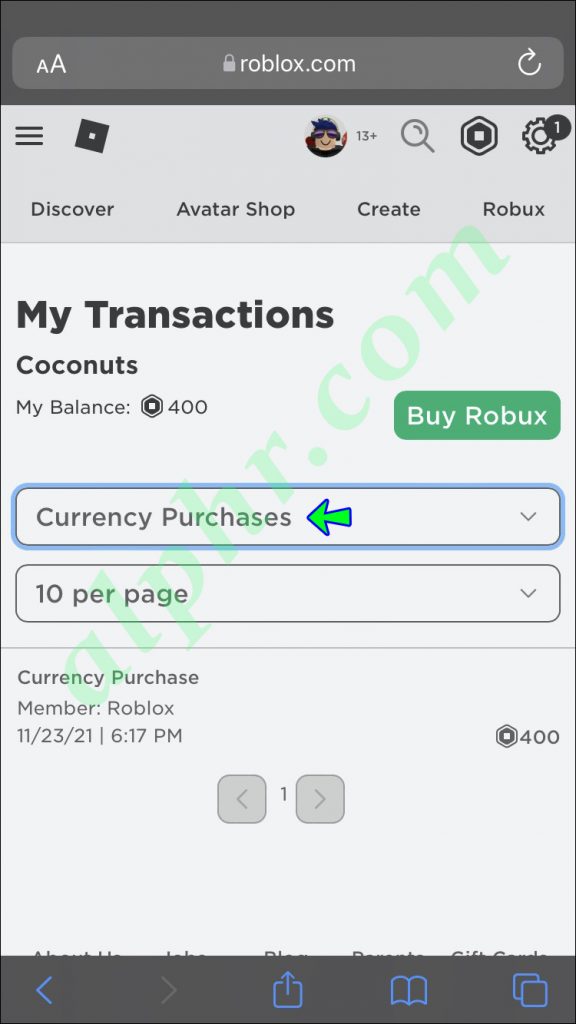
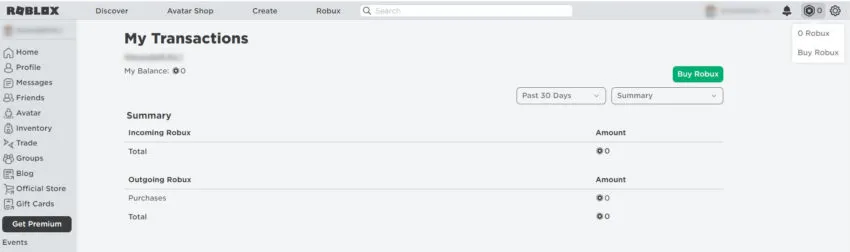
Filter Your History: On the My Transactions page, you'll find various tabs such as "Summary," "Robux Earned," "Robux Spent," "Premium Payouts," and "Promocodes." To see what you've purchased, focus on the "Robux Spent" tab for item and game pass purchases, and the "Summary" tab for an overview of all activity, including Robux acquisitions. You can usually filter by date range to narrow down your search.
Can I See My Roblox Purchase History on a Mobile Device?
Yes, you absolutely can see your Roblox purchase history on a mobile device, though the interface might look slightly different than on a PC. Many US gamers, with mobile gaming being a dominant trend this month, rely on their phones for quick checks. Here's how:
Use a Mobile Web Browser: While the Roblox app is great for playing, for detailed transaction history, it's often more reliable to use your mobile device's web browser (e.g., Safari on iOS, Chrome on Android). Go to www.roblox.com and log in.
Request Desktop Site (Optional but Recommended): Sometimes, the mobile version of the website can hide certain options. If you have trouble finding the "My Transactions" link, consider requesting the "Desktop Site" version from your browser's menu options. This makes the mobile browser render the full desktop website.
Follow PC Steps: Once logged in via the mobile web browser (or desktop site view), the steps are largely identical to the PC method. Tap the Robux icon (R$) at the top right, then navigate to "My Transactions." You can then browse your "Robux Spent" and "Summary" tabs.
What Information Does the Roblox Purchase History Include?
Your Roblox purchase history is quite detailed, offering transparency into your account's financial activities. For busy adults who game, understanding these details is crucial for balancing fun with smart spending. It typically includes:
Date and Time: The exact moment a transaction occurred.
Transaction Type: Whether it was a Robux purchase (e.g., from a credit card, gift card), a Robux spent on an item, a game pass, or a developer product.
Description of Item/Service: The name of the item, game pass, or Robux package purchased.
Robux Amount: The quantity of Robux involved in each transaction, showing either Robux gained or spent.
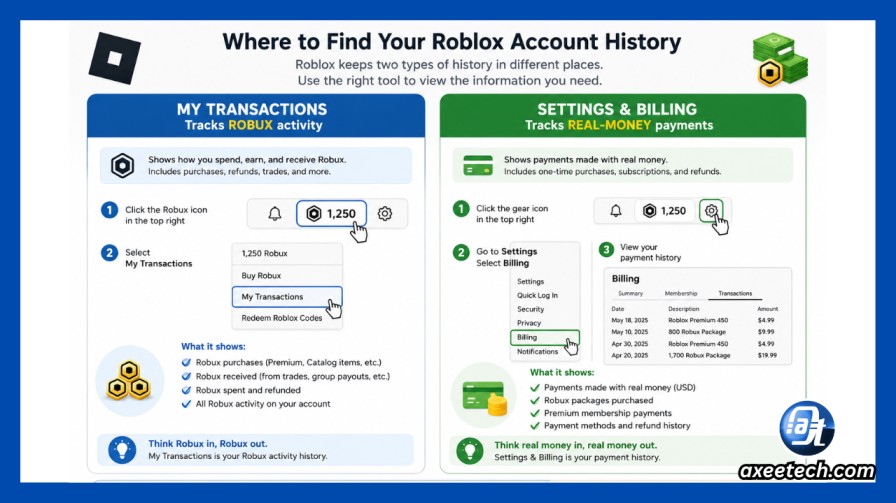
Real Money Cost (for Robux purchases): For transactions where you bought Robux directly, it often shows the real-world currency amount spent (e.g., $4.99 for 400 Robux). This is particularly useful for budget tracking.
Recipient (for gifts/transfers): If you've gifted Robux or items, this section might indicate the recipient.
This comprehensive overview helps gamers manage their finances and keep track of digital assets effectively.
Why Is It Important to Regularly Check Your Roblox Purchase History?
Regularly reviewing your Roblox purchase history is more than just curiosity; it's a vital part of responsible online gaming and financial management, especially for gamers who also manage household budgets. Here are key reasons why you should make it a habit:
Budget Management: Like any leisure activity, gaming can involve spending. Checking your history helps you monitor how much Robux you're spending and on what, allowing you to stick to a budget and avoid overspending on virtual items. This aligns perfectly with the value-for-money mindset of many adult gamers.
Account Security: Unexpected transactions could indicate unauthorized access to your account. Promptly checking your history can help you spot suspicious activity early, allowing you to change your password and contact Roblox support if necessary. Account security is a pain point for many gamers, making this a proactive step.
Tracking Missing Items: Sometimes an item might not appear in your inventory immediately after purchase. Your purchase history provides proof of transaction, which is essential when contacting Roblox support for assistance with missing items or Robux.
Parental Control: For parents managing children's accounts, reviewing purchase history is crucial for understanding what their kids are buying, ensuring appropriate content consumption, and controlling overall spending. Many gamers balance families, and this is a key aspect of responsible digital parenting.
What If I See an Unauthorized Purchase on My Account?
Discovering an unauthorized purchase can be alarming, but there are clear steps you can take. This is a common pain point that needs practical solutions:
Change Your Password Immediately: The first and most critical step is to secure your account. Change your Roblox password to something strong and unique, and consider enabling Two-Step Verification if you haven't already.
Check Other Accounts: If you use the same password or a similar one for other online services, update those passwords too. A breach on one platform can often lead to compromise on others.
Contact Roblox Support: Head to the Roblox Support page (www.roblox.com/support) and submit a detailed support request. Provide all relevant information, including the unauthorized transaction dates, amounts, and descriptions from your purchase history. Be clear that these were not authorized by you.
Contact Your Payment Provider: If the unauthorized purchase involved real money (e.g., through a credit card or PayPal), you should also contact your bank or payment provider to report the fraudulent activity. They can help investigate and potentially reverse the charges. This is often a necessary step for regaining control of your finances.
Can I Get a Refund for Roblox Purchases?
Roblox generally has a strict "all sales are final" policy for Robux and most in-game items. However, there are specific circumstances where refunds might be considered:
Unauthorized Purchases: As mentioned above, if an unauthorized individual accessed your account and made purchases, Roblox Support might investigate and issue a refund. This is usually handled on a case-by-case basis.
Technical Issues: If a purchase failed to deliver the intended Robux or item due to a verifiable technical error on Roblox's end, you might be eligible for a refund. Again, contacting Roblox Support with detailed information and proof (like your purchase history) is essential.
Accidental Robux Purchases by Minors: In some regions, or under specific circumstances related to minors making purchases without parental consent, refunds might be possible. This typically requires a parent to contact Roblox Support directly and provide proof of ownership of the payment method.
Always reach out to Roblox Support first to discuss your specific situation. They are the best resource for official policy and assistance.
Does My Purchase History Show Game Pass Buys?
Yes, your Roblox purchase history comprehensively tracks your Game Pass buys. When you navigate to the "Robux Spent" tab within your "My Transactions" page, you will see a detailed list of all items and services you've acquired using Robux. This includes purchases of Game Passes from various experiences, developer products, and items from the Avatar Shop. Each entry will typically show the date of purchase, the name of the Game Pass or item, and the amount of Robux spent. This level of detail is invaluable for gamers who want to track their engagement with different experiences and manage their in-game investments efficiently.
How Far Back Can I View My Roblox Purchase History?
Roblox typically allows you to view a significant portion of your account's history, often going back several years. While there isn't a universally stated hard limit, most users can access a comprehensive record of their Robux transactions from the creation of their account, or at least for a very long period. The "My Transactions" page usually includes filtering options that let you select different date ranges, such as "Last 7 days," "Last 30 days," "Last 3 months," or even "All Time." This extensive record helps both individual players and parents maintain long-term oversight of spending and account activity, which is especially beneficial given the longevity of many Roblox accounts and the consistent activity of players, with 87% of US gamers playing regularly.
Conclusion
Mastering how to see your Roblox purchase history is an essential skill for any engaged gamer, particularly those balancing real-world demands with virtual adventures. It empowers you to maintain control over your spending, safeguard your account, and troubleshoot any issues with ease. By regularly checking your transaction logs on the Roblox website, whether on PC or mobile, you ensure transparency and peace of mind. Remember, smart gaming isn't just about winning; it's about playing responsibly and getting value for your time and money. What's your biggest gaming challenge when it comes to managing in-game purchases? Comment below and share your tips!
Frequently Asked Questions About Roblox Purchase History
Is there a way to track Robux earned from game development?
Yes, on the "My Transactions" page, navigate to the "Robux Earned" tab. This section details all Robux you've gained through game passes, developer products, Premium Payouts, and other monetization methods, separate from Robux you've purchased directly.
Can I see my friends' Roblox purchase history?
No, for privacy and security reasons, you cannot view another user's Roblox purchase history, including that of friends or family members, unless you have direct login access to their account. Each account's transaction log is strictly private.
What if an item I bought is missing from my inventory?
If a purchased item is missing, first check your inventory thoroughly. If it's still absent, use your purchase history (Robux Spent tab) to confirm the transaction, then contact Roblox Support with the transaction details for assistance. They can help verify the purchase and restore the item.
Are pending Robux purchases visible in my history?
Pending Robux purchases or transactions that are still processing may not immediately appear in your detailed "My Transactions" log. They typically show up once the payment has been fully processed and the Robux have been credited to your account. Check your payment provider for pending status.
Does Roblox send email receipts for purchases?
Yes, Roblox typically sends email receipts for direct Robux purchases made with real money. These receipts are sent to the email address associated with your Roblox account. It's a good practice to keep these emails for your records as an additional form of verification.
Can I filter my purchase history by specific game?
While the "My Transactions" page provides general categories like "Robux Spent," it does not offer a direct filter to view purchases specific to a single game or experience. You'll need to manually scroll through the "Robux Spent" list and identify items by their description to track spending in particular games.
Accessing Roblox purchase history is essential for budget management and account security. You can easily view your Robux transactions and item purchases directly through the Roblox website via your browser on PC or mobile. This includes reviewing Robux acquisitions, spending on game passes, items, and developer products. Regularly checking your history helps identify unauthorized activity and track your value for money, a key concern for adult gamers balancing life and play.
35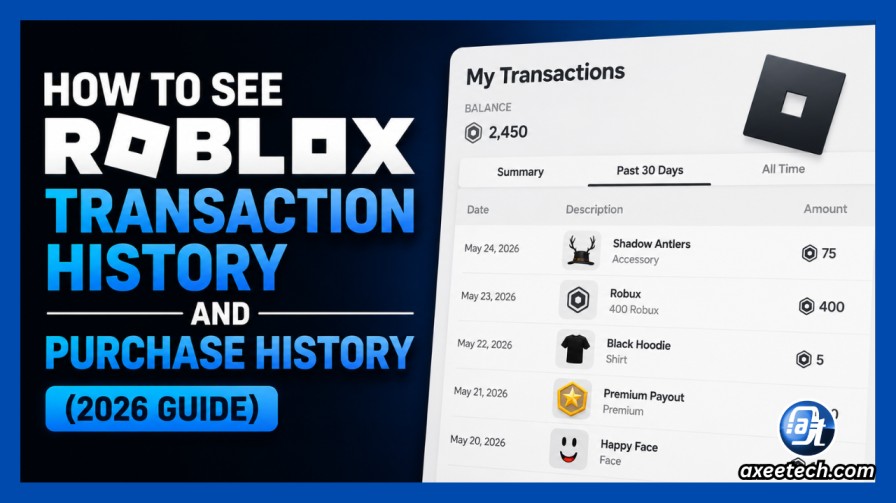


How To See Roblox Transaction History And Purchase History 2026 Guide Roblox Transaction Purchase History 2026 Guide . How To See Roblox Transaction History And Purchase History 2026 Guide Roblox My Robux Icon Purchases Filter . How To See Your Roblox Purchase History Easily . How To See Your Roblox Purchase History Easily . Check Roblox Purchase History On PC View Your Transaction Records


How To See Roblox Purchase History IPhone Android 2024 New Method . How To View Purchase History In Roblox Roblox Android View Robux Purchase History 0007 . Roblox History How To View Purchase History In Roblox RGNC . How To See Roblox Purchase History YouTube . How To View Purchase History In Roblox Roblox Android View Robux Purchase History 0006



How To See Roblox Transaction History And Purchase History 2026 Guide Roblox Two Doors My Vs Billing . How To See Transaction Purchase History On Roblox YouTube . How To See Roblox Purchase History On Mobile 2026 YouTube . How To See Your Roblox Purchase History Easily Ios 17 Iphone 15 Pro App Store Account Purchase History . How To See Roblox Purchase History YouTube



How To View Purchase History In Roblox Roblox Windows View Purchase History 008 608x510 . How To See Roblox Purchase History Update YouTube . How To See Your Roblox Purchase History Easily . How To See Your Roblox Purchase History Easily Steps To Check How Much Have You Spent Roblox Pc Mobile .webp. How To Check Your Roblox View Purchase History YouTube

Roblox History How To View Purchase History In Roblox RGNC Load Roblox Using Web . How To View Purchase History In Roblox Roblox Android View Robux Purchase History 0009 280x320 . Robux Transaction History How To Track Your Spending In Roblox Lawod How To Check Your Robux Transaction History . How To View Purchase History In Roblox IMG 7184 576x1024 . How To View Purchase History In Roblox Roblox Android View Robux Purchase History 0008



How To View Purchase History In Roblox IMG 0828 . How Much Have I Spent On Roblox How To Check Roblox Purchase History Robux 850x252 . How To See Roblox Transaction History View All Purchases Hone Blog How To See Roblox Transaction History View All Purchases 1024x528 . How To See Your Roblox Purchase History Easily Screenshot 4 27 499x320 . How To View Purchase History In Roblox Roblox Windows View Purchase History 0006 300x219



How To See Roblox Purchase History YouTube . How To View Your Transaction Purchase History On Roblox Mobile 2025 . Can You Buy Roblox Premium With Robux In 2026 Find Out Now Roblox Premium 3 . How To See Roblox Purchase History YouTube . How To Check If A Roblox Player Has Premium In 2026